


Can't Save File when "Edit in Adobe Photoshop" Invoked
Steps to reproduce:
1. Have a PNG in a bin that I want to tweak in Photoshop.
2. Dig thru menu to find "Edit in Adobe Photoshop"
3. Photoshop opens, I make the tweak
4. File | Save (save over original)
Result: ..."Could not save as <filename> because the file is already in use or was left open by another application."
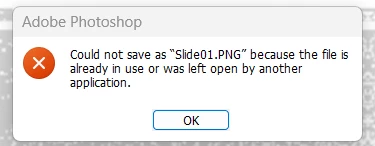
Expected: ... For the file to save and the bin and timeline to be updated automatically (as it always has in the past).
After closing Photoshop I could rename the file to have it auto-update in the timeline while Premier was running.
And if I'm exporting from PowerPoint and overwriting an existing file, it works as expected. Nothing prevents it from saving and automatically updating the bin and timeline.
System info
Application: Premiere Pro (Beta) v26.0.0.18 Photoshop v27.0.0 Release (Beta)
OS: Windows v10.0.26200, RAM: 63.79 GB GB, CPUs (logical): 16
 AdChoices