


BeratGL
Known Participant
October 11, 2026
Open for Voting

Color Picker Dialog allows values beyond the range
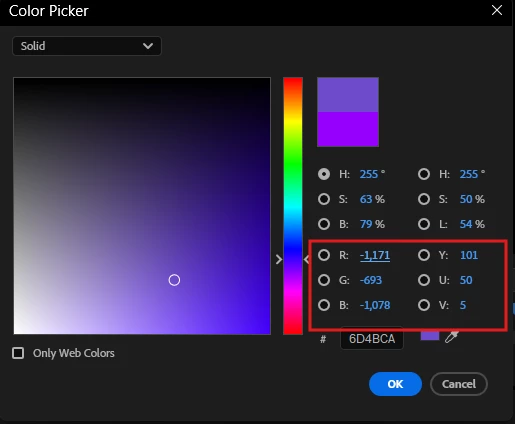
On the area that is highlighted with red box, all of them both can go above 255 or can go negative value.

    9 replies

    Ann Bens
    Community Expert
    Community Expert
    October 13, 2026

    That is where I must have see this in the past: graphics

    I tested only effects.

    Yes, definitely a bug.

    Translate
    BeratGL
    BeratGLAuthor
    Known Participant
    October 13, 2026

    I identified that this only happens when changing color inside Text or Graphical Shapes. It doesn’t happen when changing color inside effects such as drop shadow. That’s the reason I momentarily thought this was fixed as I was adjusting color of an effect.

    Translate
    BeratGL
    BeratGLAuthor
    Known Participant
    October 13, 2026

    Bug fixed on its own when I resetted preferences and cleared cache. Weird it would result in this bug though.

    Translate
    Ann Bens
    Community Expert
    Community Expert
    October 13, 2026

    Not a bug but a glitch.

    Translate
    BeratGL
    BeratGLAuthor
    Known Participant
    October 13, 2026

    Nah it’s definitely a bug. Was only behaving momentarily and now it’s happening again.

    Translate
    Ann Bens
    Community Expert
    Community Expert
    October 12, 2026

    Might has seen this not so long ago. Not seeing it now W11pro 27.1 B13

    Translate
    BeratGL
    BeratGLAuthor
    Known Participant
    October 12, 2026

    Strange, You should totally be able to replicate this by dragging the values. Though, visually selecting the color it doesn’t go over 255 or go negative value. Only adjusting the values manually.

    Translate
    Ann Bens
    Community Expert
    Community Expert
    October 12, 2026

    Nope cannot reproduce.

    Translate