



Dropdown Menus Can No Longer Be Changed Using the Mouse Wheel
Previously, when the mouse cursor was on a dropdown menu, scrolling the mouse wheel allowed the user to cycle through and select the available options. This functionality no longer appears to work.
Steps to Reproduce
- Hover the mouse cursor over the dropdown menu.
- Scroll the mouse wheel.
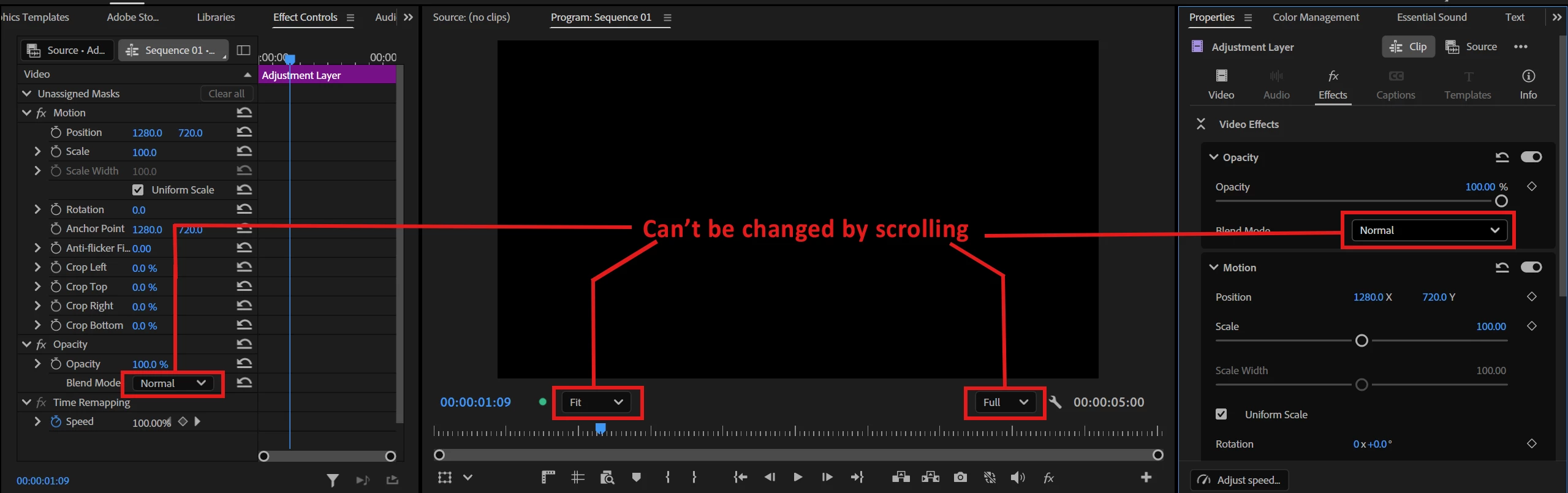
Expected Result
Scrolling the mouse wheel while hovering over the dropdown menu should allow the user to cycle through the available options and change the selected value.
Actual Result
Scrolling the mouse wheel does not change or navigate through the options in the dropdown menu.
Impact
Zoom and preview resolution menus now go 1 frame forward/backward upon scroll and blend modes on both ECP and Properties panel can’t be changed by scrolling anymore. I haven’t tested every dropdown menu but issue seems to be global across all dropdown menus.
System info
Application: Premiere Pro (Beta) v27.0.0.29
OS: Windows v10.0.26200, RAM: 31.82 GB GB, CPUs (logical): 24
GPU: Rtx 3060 Ti Nvidia Studio Driver ver. 610.88
 AdChoices