


Essential Sound “Auto-update keyframes” does not update music ducking
I’m working with multiple language sequences in Premiere Pro Beta. The music clip is tagged as Music, ducking is enabled, and Auto-update keyframes is turned on.
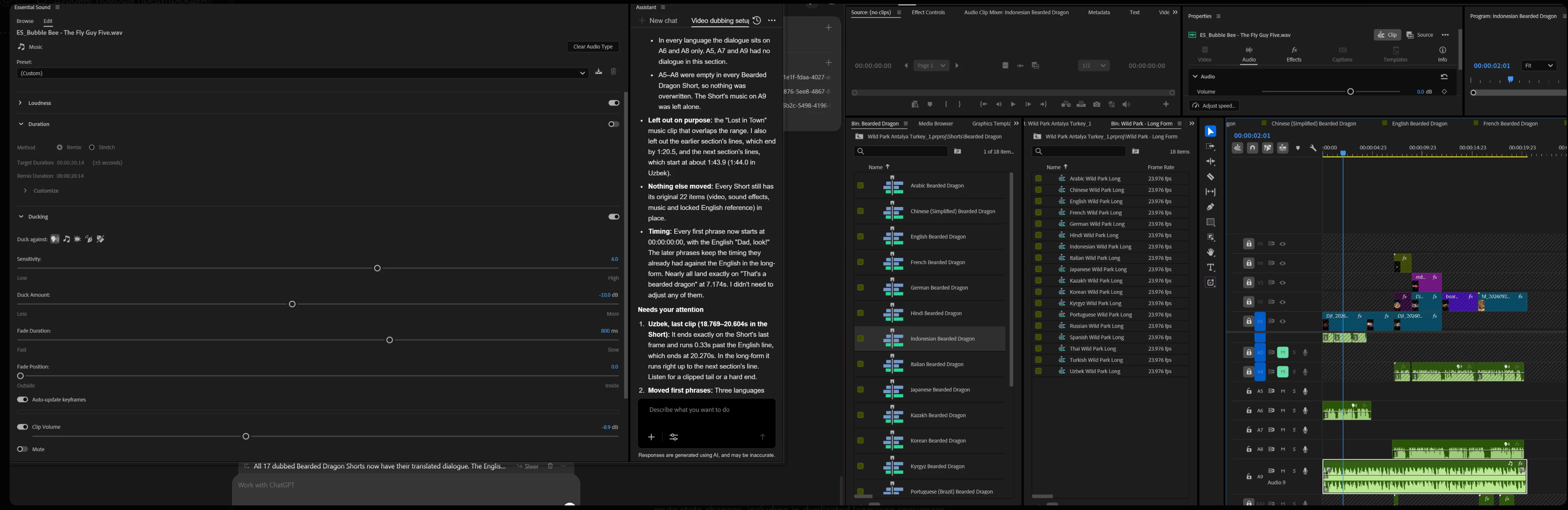
After AI Assistant adds translated dialogue to a new language sequence, when I mute the English reference audio while another language’s dialogue is on the tracks below, the music ducking keyframes do not update to reflect the audible dialogue. There are no keyframes at all.
Expected: With Auto-update keyframes enabled, the music ducking should update when dialogue is added or its mute state changes, including in duplicated language sequences.
Actual: I have to turn Auto-update keyframes off and back on to make it recalculate. I need to repeat this manually in each affected sequence.
The attached screenshot shows the Essential Sound ducking settings and a Bearded Dragon language sequence. Please check whether changes made by AI Assistant and changes to track mute states are being detected by Auto-update keyframes.
[Moved to Premiere (Beta) by a moderator]
 AdChoices