


Participating Frequently
August 3, 2025

Exporting Insta360 X5 video failed in Premiere Pro

  • August 3, 2025
  • 3 replies
  • 197 views

I imported Insta360 X5 video file (*.insv) and edited it with Insta360 Plugin.

but Premiere Pro keeps failing exporting edited video clips as you can see following error message 
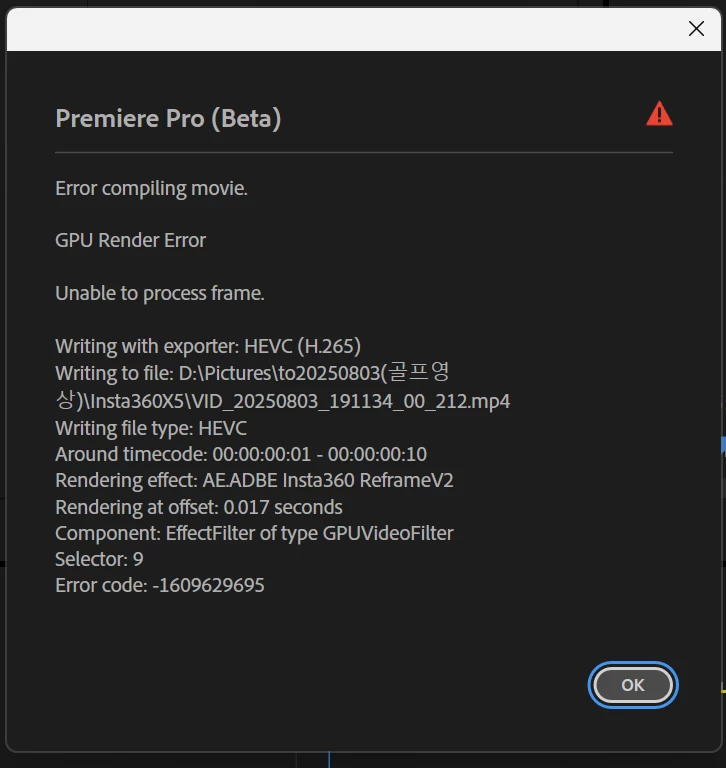


I would like to sort out this problem. 

I


3 replies

Participant
November 13, 2025

I had the same issue, but i changed the preset for the export, to "Match Source/Adaptive High Bit Rate" And it worked just fine. 


I did restart and only had Premiere open. 

Von Leigh
Participant
September 25, 2025

Mine failed yesterday as well, I've a super fast computer, the export was horrible poor quality, distorted images after following precisely all plug-ins instructions for resolution refraining. So I'm using insta360 studio will export at pro resolution or h265. Then I'm importing that mp4 into pinnacle for dubbing narration, adding music since they have audio ducking . It's work but really not anymore than Adobe as it's clunky using their plugin effects overlay, always many adjustments per clip. Good luck, ask if you need details

Ann Bens
Community Expert
Community Expert
August 3, 2025

Moved to beta forum