mc_finney
Known Participant
January 29, 2024

Incorrect Duplicate Frame Markers

  • January 29, 2024
  • 2 replies
  • 359 views

System info
    Application: Premiere Pro (Beta) v24.3.0.14
    OS: macOS v12.7.1, RAM: 64.00 GB GB, CPUs (logical): 16


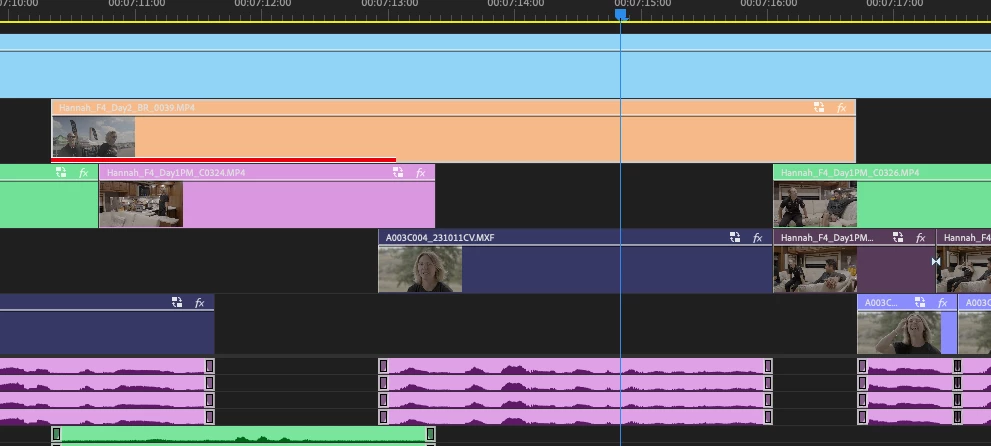
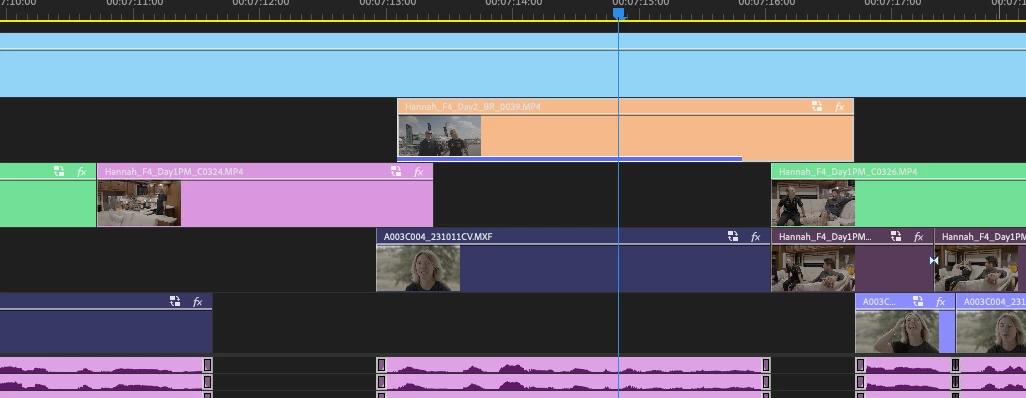
Duplicate frame markers will show on frames that don't appear anywhere else in the sequence, and when I drag out the clip the duplicate frame markers move to a different part of the clip. 
2 replies

hellopaul4
Inspiring
March 11, 2024

Am I right in thinking that the "Show Duplicate frame Markers" never worked with nested sequences? For example:

I have a sequence that is a series of interviews (John, Joe and Phil), each one is a nested sequence with some B-roll footage taken from a common bin of B-roll shots. I do not want to use the same B-roll shots more than once throughout the programme. But if I use the exact same B-roll shot in John, Joe and Phil's interviews (each one is a separate sequence), none of the shots have the "Duplicated Frames" indicator. If I use the same clip in the same sequence (eg. I repeatedly paste a clip into John's interview), then the Duplicated Frames show up indicated as expected.


Was this always as-designed? It seems ludicrous that, just because a shot is used in a separate sequence in the same project, it doesn't get marked as a duplicate. Or is this a new bug? (I have not used any multi-cam sequences at all in my project).

Participating Frequently
February 2, 2024

I am also having this issue. 24.1.0