
Participant
September 21, 2024

Media file dropped in timeline issue. Unable to select, play or delete it

  • September 21, 2024
  • 11 replies
  • 650 views

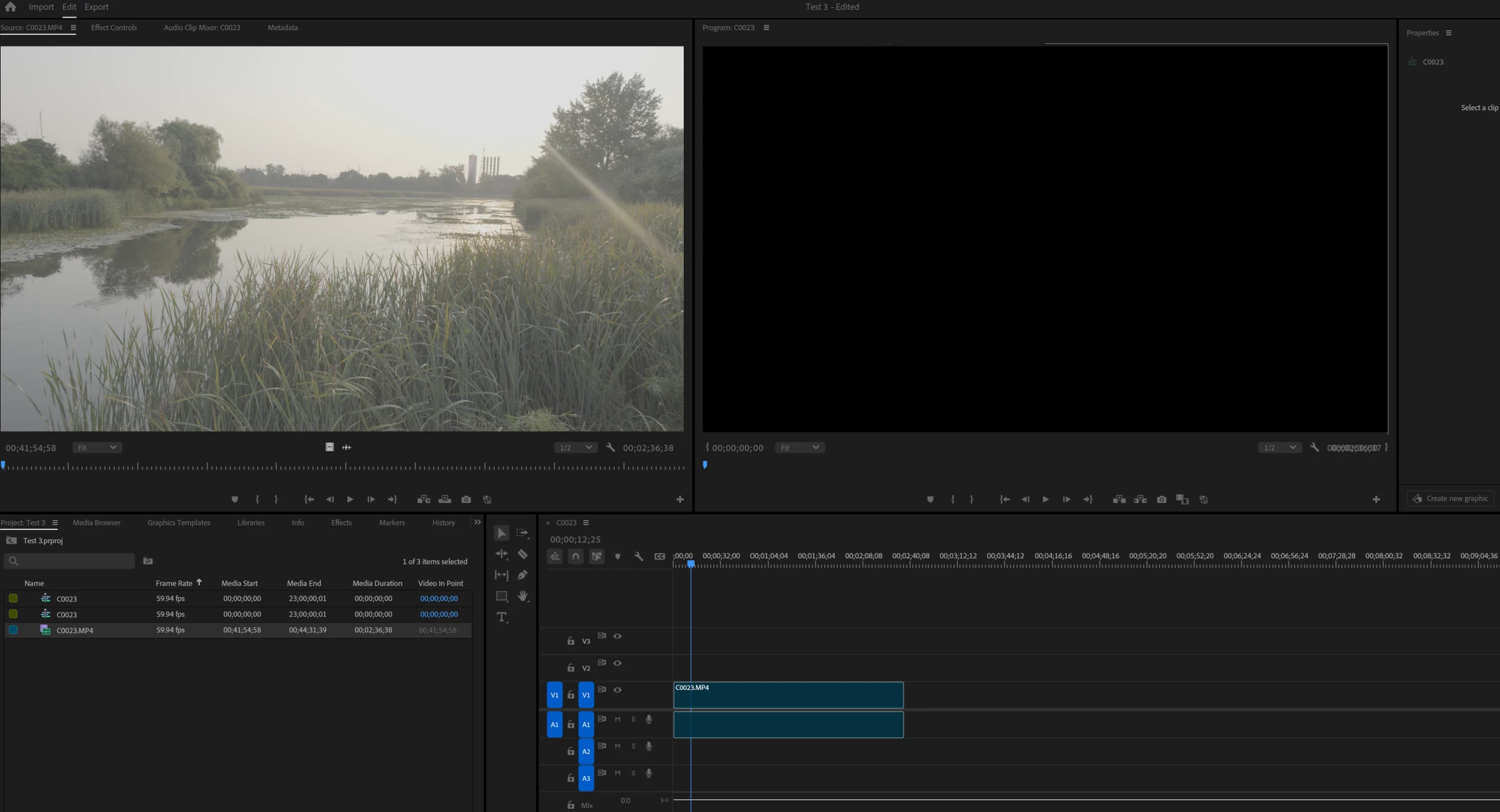
See snapshot of a strange issue as of recent update. The video media becomes a blank blue bar on dtopping it into the timeline. I am also unable to select, play or delete it. The more is visible and playable in the Source movie window but not i the Program movie window.
 

    11 replies

    R Neil Haugen
    Legend
    September 30, 2024

    It's now fixed in build 31.

    Everyone's mileage always varies ...
    Participant
    September 27, 2024

    Thanks for sharing this workaround; it worked! It’s disappointing to see, though, that despite reporting this issue and with two updates to the beta since, the Adobe team has not addressed it.

    Known Participant
    September 26, 2024

    Thanks for finding a good workaround!

    R Neil Haugen
    Legend
    September 26, 2024

    Yea, right?


    Although it always said there was a mismatch between clip and sequence even with the sequence created by the clip.


    Figure that one out.


    AND yea, setting default scaling to None worked.

    Everyone's mileage always varies ...
    Known Participant
    September 26, 2024

    Wow, that's a super annoying little bug! 


    That work-around worked though - Preferences / Media / Default Scaling - NONE.


    Strangely, my issues were all just with audio, but scaling it seems to be a video feature, I think, right?

    R Neil Haugen
    Legend
    September 26, 2024

    From other threads on this, you might try either setting Preferences default scaling to none, or trash Preferences.

    Everyone's mileage always varies ...
    Participant
    September 25, 2024

    its what we get for wanting to be on the bleeding edge and work with Beta programs. HAHA 

    Participant
    September 25, 2024

    you saved me from having to rebuild a project.  It is a small project but it saved me lots of time looking at this post. Thank you 

    Participant
    September 24, 2024

    TEMP FIX:


    Clicking the "other versions" option where Premiere Pro Beta is shown within your Creative Cloud app and installing version 25.0 fixed it. The whole source-patching issue on the audio+video tracks in timeline still requires me to toggle it into working by double clicking (any) media clips containing both audio and video inside of the project panel to bring it into the source monitor. Other than that- so far I can at least edit again now. Half a day of work is torched though- just another one of the zesty realities of editing I guess.

    Participant
    September 24, 2024

    Same. this is maddening. Tried everything from rearranging, deleting, and restructuring cache folder and cache settings, checked the permissions for all media and cache files, etc....Source patching video and audio tracks is glitching as well- not sure if that is somehow connected or coincidental since I know that has been an issue in the past (but that never correlated with this "blank nothing" clip insertion glitch in the past- so who knows if those are related. Double clicking any media to open it within the source monitor magically fixes the source patch issue). I'm going to try and see if I'm able to install a previous version of PrPRo Beta...man, I hope someone sorts out how to fix this(or educate the rest of us on how to)- quicklike. Glad to see that someone has posted on this (although I'm sorry you're dealin' w it too)....if I find a fix I'll follow up