


theok8577996
Inspiring
February 13, 2025

Mediacache settings does not work

  • February 13, 2025
  • 3 replies
  • 259 views

in Prefs> mediacache management  >>> automatic delete oldest    does not work.

If you set a new value, next time you look to it it's changed to extreme high values
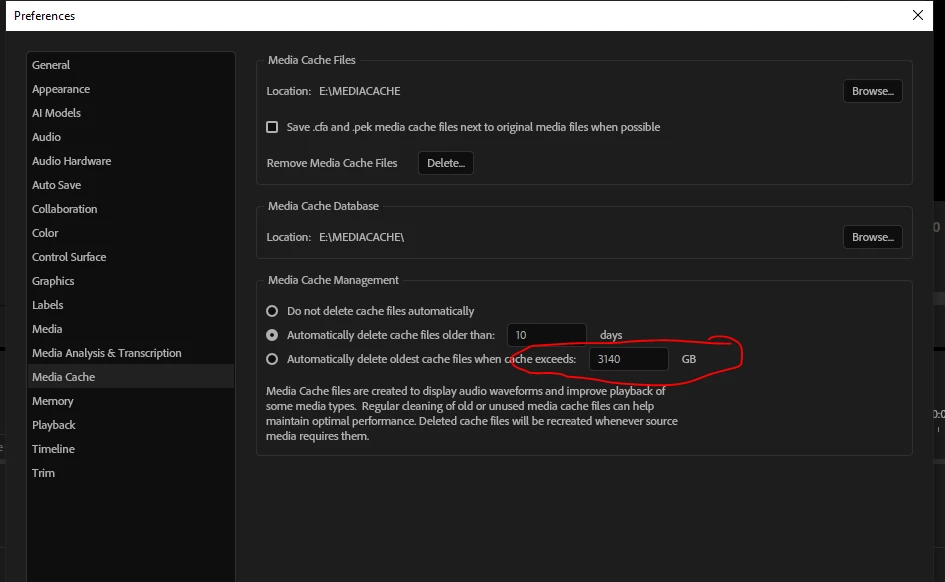


This can 100% be reproduced on Win10 and Win 11

3 replies

Stan Jones
Community Expert
Community Expert
July 30, 2025

@theok8577996,


I never use this setting, but was curious. And yes, upvoted, its not working as expected.


PR Beta 25.6.0.14. Win11. Note that I frequently reset the cache for testing, and it is under 2 MB at the moement.


I changed the preferences setting from my current "do not delete" to "when cache exceeds," leaving the default of 45GB. I exited and entered preferences, and it remains 45 GB.


If I click outside the entry box, it shows the number I entered; then I click OK.


I changed it to 10GB, and on entering, it shows 453GB.

I change to 45GB, it shows 1GB.

I tried 45 again, it shows 1.

Change to 10, shows 453.


And finally, I changed back to "never," which works. Then back to cache exceeds 45, and it shows 1.


Stan


theok8577996
Inspiring
July 30, 2025

steps

go to prefs and set the third option (delete oldest)  to 10 GB

click OK

and go again back to this setting.

On my system another random value is set


Bruce Bullis
Community Manager
Community Manager
February 13, 2025

Your post mentions 'delete oldest', but your screenshot focuses on 'delete after size limit reached'.

What step-by-step instructions shall we follow, to reproduce the behavior you've encountered?