
Mercury Transmit Not Filling UHD Display
I added a UHD (3840x2160) display for Mercury Transmit monitoring, #4 on my nVidia GeForce 2080ti graphics.
The Mercury Transmit image fills only 2/3 of the monitor, locked to the lower left corner.
I tried the scaling in the nVidia control panel but it does nothing to change it. It is currently set to "no scaling." In Windows display settings, scaling is 100%. Other programs fill the screen properly, but both beta and the current production build do the same.
Even if I put the monitor in 1920x1080 resolution, the image still renders the same.
Is this a bug or is there a trick to getting full screen?????
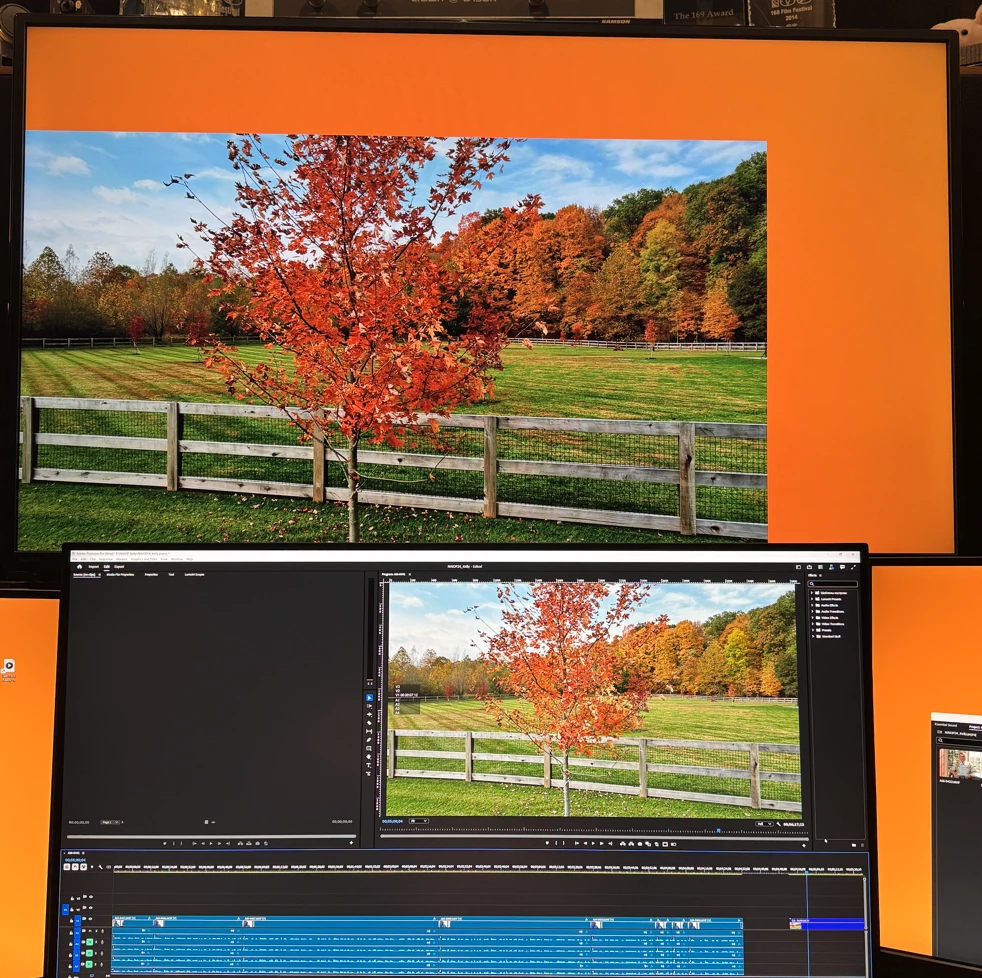
(I don't usually have an orange desktop background...only so you can see the problem.)
System info
Application: Premiere Pro (Beta) v25.2.0.2
OS: Windows v10.0.22631, RAM: 63.83 GB GB, CPUs (logical): 16


 AdChoices