


Participant
April 10, 2026

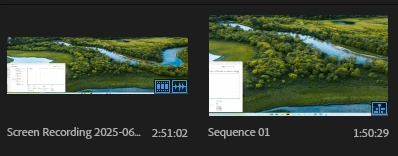
Mis-Interpretted clip resolution (2560x1440 appears as 56.4% wider)

  • April 10, 2026
  • 1 reply
  • 37 views

Premiere Version 26.3.0 BETA StaticLib (Build 40)

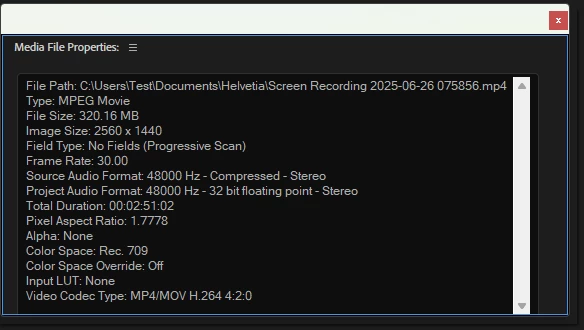
I have a project that only has one 2560x1440 clip that gets interpreted incorrectly in this Beta release, but correctly in the current release (26.0.2 (Build 2)). Here are the clip properties:
Here is how the clip and its sequence appear in the bin:
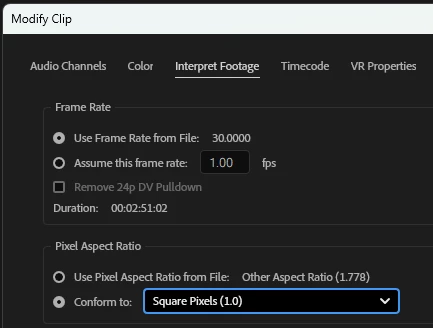
If I tell Premiere to re-interpret the footage, specifying square pixels, then everything looks right:
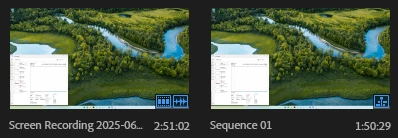
 

Again, this step isn’t necessary in the Release version.

Please let me know if you need more information, or would like to examine the clip.

Thank you,

Rick Hohmann 

    1 reply

    Shebbe
    Community Expert
    Community Expert
    April 13, 2026

    Just to double verify, it could also be the opposite that it was not detected correctly in release versions. You can inspect a video file with a handy free tool called MediaInfo. I would check if the pixel format is square via that app, maybe it was encoded incorrectly.

    Participant
    April 13, 2026

    Hi Shebbe,


    I thought of that too, so I looked in MediaInfo and didn’t see the field that reports pixel ratio. I have attached the text output here.

    This project was upgraded from the 2025 version where the image wasn’t stretched either, so it just appears to be the Beta is getting it wrong. Since the project was an upgrade from an earlier version, I thought I’d try importing that clip into a brand new project started in the Beta version, and there, even in Import mode, the thumbnail is interpreted incorrectly:

    Stretched wide, but should be 16:9 aspect ratio.

    Please show me how to see the pixel aspect ratio in MediaInfo.

    Thank you!

    Shebbe
    Community Expert
    Community Expert
    April 13, 2026

    Sorry, I was under the assumption that MediaInfo would show it, but it only shows “Display Aspect Ratio” which is not really the same. It display 16:9 as that if that's the ratio of the  resolution, and something like 1.896 if it’s not a ‘display standard’ like this sony raw clip which is still square pixels.

    If in doubt you could always check other apps like After Effects or Resolve for example and see what happens there, but it does sound like something is wrong in the Beta.