


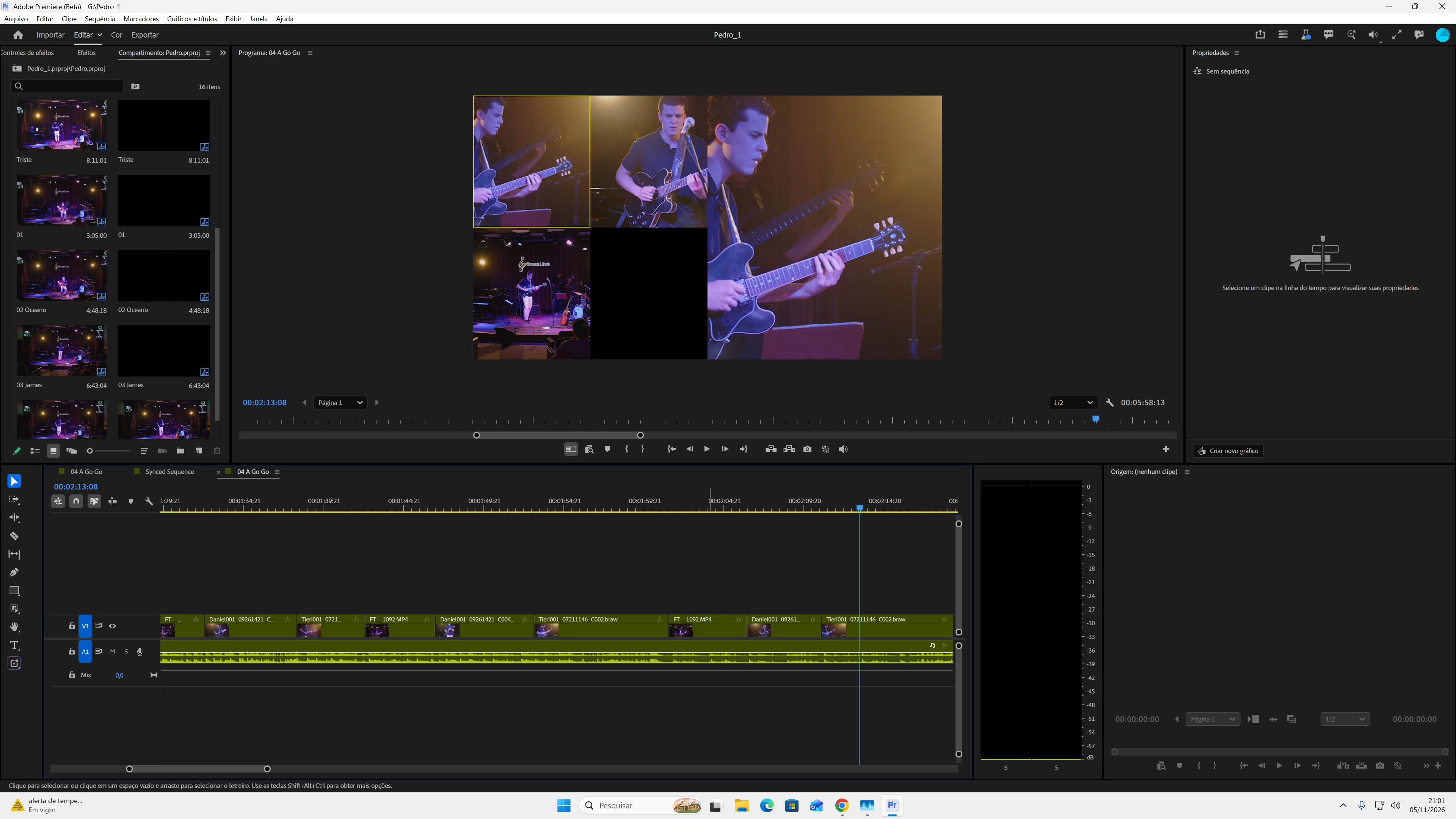
Multi-Camera monitor angle thumbnails/previews are incorrectly cropped to a square (1:1) aspect ratio instead of displaying the original 16:9 widescreen frame.
Multi-Camera monitor angle previews are rendered with distorted, narrow/vertical aspect ratios (narrower than 1:1), aggressively cropping the horizontal sides of 16:9 source footage and preventing full-frame monitoring until Multi-Camera mode is disabled.
Steps to Reproduce:
-
Open Premiere Pro Beta.
-
Open any existing project or create a new sequence containing standard 16:9 multicam footage (e.g., MP4, MOV).
-
Enable Multi-Camera View mode in the Program Monitor (Shift + 0).
-
Inspect the individual camera angle tiles in the multicam grid.
-
Toggle Multi-Camera mode off to compare with the full Program Monitor view.
Expected Result:
Multicam angle tiles should honor the native 16:9 aspect ratio, displaying the full widescreen frame for all cameras without cropping.
Actual Result:
Angle preview tiles are squeezed/cropped into an unnatural vertical/narrow framing (narrower than a square/1:1), cutting off significant portions of the left and right sides. The full 16:9 image only appears when disabling Multi-Camera mode.
Screen Recording / Screenshots:
Attached screenshot showing the vertically cropped/distorted angle previews in Multi-Camera mode. (Anexe o print da tela aqui)
Premiere Version:
Premiere Pro (Beta) v27.1.0 (Build 38, static lib)
Operating System:
Windows 11 Enterprise
CPU:
AMD Ryzen 7 5700X
GPU and Driver:
NVIDIA GeForce RTX 3050 (8 GB) — NVIDIA Studio Driver 621.14 (Release date: Nov 4, 2026)
RAM:
32 GB
Video Format:
Affects all 16:9 video formats tested (MP4, MOV, etc., regardless of resolution or frame rate).
Project Size:
Affects projects of all sizes (lightweight test files to multi-clip timelines).
Helpful Context:
-
Does it affect all projects or only some? All projects tested are affected.
-
Does it affect new, empty projects? Yes, reproducing multicam sequences in brand new, clean projects produces the exact same vertical cropping.
-
When did the problem first begin? Started immediately after updating to Build 38. Previous builds displayed the 16:9 grid correctly.
-
Troubleshooting attempted: Launched Premiere holding the Shift key and checked all 4 reset options (clearing preferences, media cache, and plugin caches). The aspect ratio distortion persists after a complete reset.
 AdChoices