


New Proxy Creation Workflow Bug
Hi! Appreciate the new proxy workflow. Nice to be able to specify 1/4, 1/2, full resolution. Wish there was an option for ProResLT in the default as ProResProxy files tend to be a little to heavily compressed for my taste.
The bug I am expereincing is this.
Import media (FS7 / 8 channel audio / MXF / 3840 x 2160)
Right click -> proxy - > create proxy
Frame size set to Custom - > 1280 x 720 (Leave untouched)
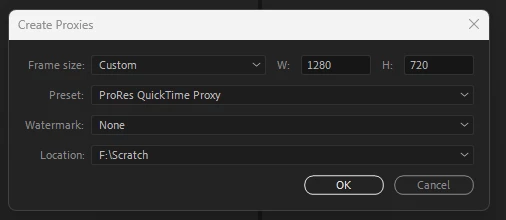
Encode in media encoder...
File comes back as 1920 x 1080....
Weirdly if you set it to 1281 x 721 it will render to that resolution. I think there is some bug where if it set to 1280 x 720 it actually ingores that default input value.
Like if I set back to 1280 x 720 from 1281 x 721, it will then render at 1280 x 720 but not every time. If you only change one of the numbers it goes a bit haywire. Seems a bit inconsistent something weird going on there.
Thanks,
 AdChoices