


Participant
September 9, 2026

Numerical keys not accepted correctly in 'enhance dialogue' Premiere Pro tab.

  • September 9, 2026
  • 6 replies
  • 21 views

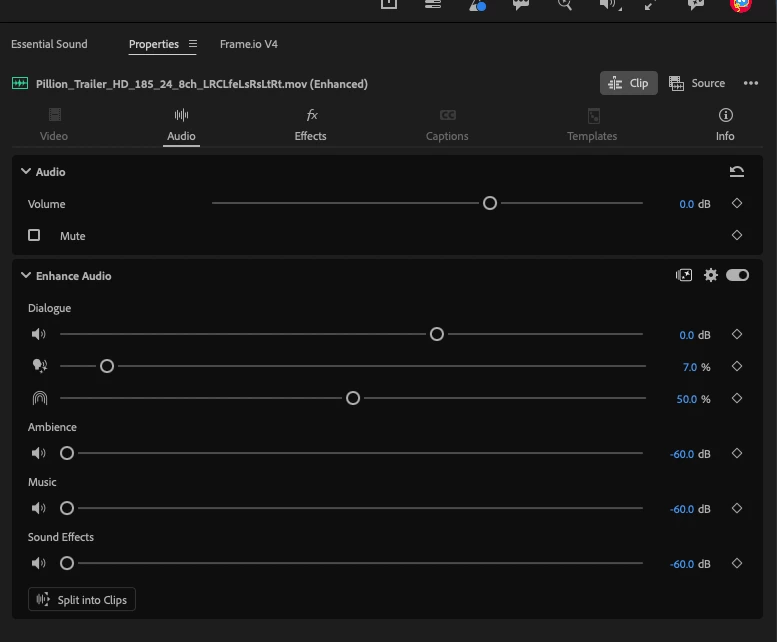
If inputting value change via numerical keys when using 'enhance Audio' feature tab, only the first key press is accepted. eg, changing 'mute dialogue enhancement' from default 50% to 75%, only the '7' is accepted, not '75' when using numerical keys. Slider is fine, but box doesn’t seem to accept multiple inputs at the same time.


6 replies

Adobe Employee
September 9, 2026

This is a known bug that is being worked on at the moment. In the meantime, you can change the numerical values of Enhance Audio V2 in the Effects tab of the Properties panel

MyerPj
Community Expert
Community Expert
September 9, 2026

Still Working, gif is the only format I can find to post inline, so it’s harder to tell with this, but it will have to do.


MyerPj
Community Expert
Community Expert
September 9, 2026

I just tried it again, same version 27.0 b41. I tried waiting but it works OK.

I was hoping you’d respond with your OS and Version #’s.

BTW: I do have a very similar problem, for years and years, I have a USB numeric keypad, and if I try to enter a timecode, the tc goes away almost instantly, and with no movement of the time indicator. If I turn on the numlock for the regular keyboard, then I can type in the numeric keypad and it mostly works. But I got the numeric so I wouldn’t have to keep toggling numlock.

Participant
September 9, 2026

Hah. Sorry, OS and Premiere versions are as follows, but I’ve noticed this on my personal laptop as well as my work one, but should both be on the same builds.

It seems to only affect the input boxes in the ‘Enhance Audio’ section, as there’s no issue changing the volume input in the ‘Audio’ section.

Prem Beta: 27.0.0 (Build 43)
Tahoe 26.6.2 (25G83)
 

MyerPj
Community Expert
Community Expert
September 9, 2026

It seems to be working for me on Windows.

Windows 11 25H2 (clean) - PPB - 27.0 b41

Participant
September 9, 2026

I’ve tested a bit more, and it seems to work if the keys are entered very quickly with virtually no gap between button presses, but if there's a slight gap it doesn’t register/accept the second character.
 

Seems the input box doesn’t stay active long enough after first imput is made...