


Open for Voting
Panels don't load, switching between workspaces crashes Premiere
Steps to reproduce:
1. Open project
Result: I get the popup below. After clicking OK it opens to a gray sceen with no panels open. Sometimes I can get panels to show by choosing an option from the menu (Audio, Editing, etc.) , but other times changing between them shows blank panels or crashes Premiere Pro completely.
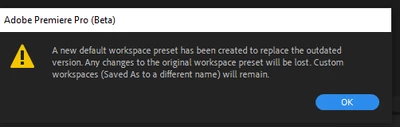
Expected: Normal functionality.
System info
Application: Premiere Pro (Beta) v24.3.0.35
OS: Windows v10.0.19045, RAM: 31.89 GB GB, CPUs (logical): 16
 AdChoices