


Playback selection in Transcript window breaks after applying an Audio Channel Preset
Playback selection in Transcript window breaks after applying an Audio Channel Preset in the clip > modify
Premiere Pro Beta V. 26.1.1 (Build 14)
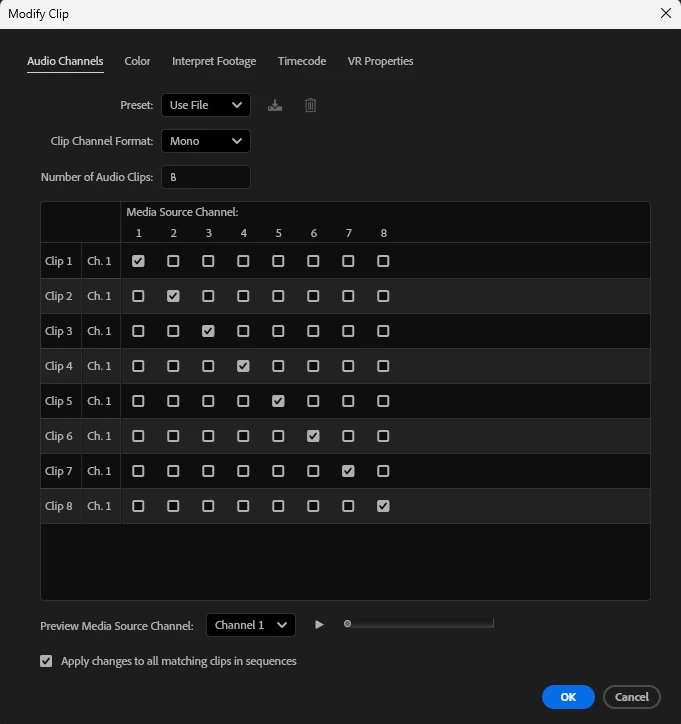
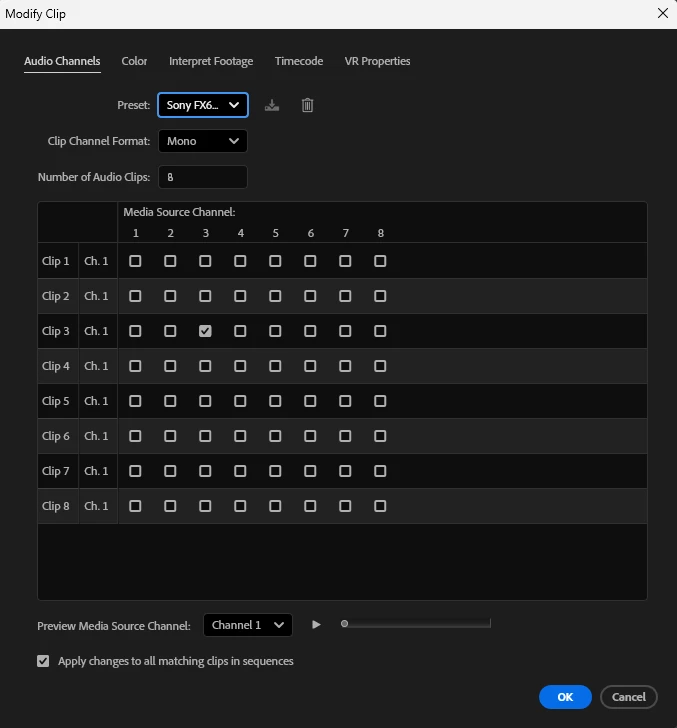
Selections and playback within the Transcipt window works fine until applying an audio channel preset in the clip > modify window.
Example:
clip >modify>audio channel setting default preset (transcript playback works fine)
clip >modify>audio channel setting 'Sony FX6' preset (transcript playback breaks)
Use case:
I record with Sony FX6, boom mic audio is on channel 3. I transcribe the source clip using channel 3. When scrubbing/reviewing the clip I only want to hear Channel 3 audio (good audio track).
Side note: I'd also love it to only import Channel 3 audio into timeline when inserting clips into the timeline (from transcript window or source window). Not sure if that exists already. Currently, I have 8 channels of audio into the timeline and I typically only need the one channel. I then have to delete unwanted audio tracks.
 AdChoices