


Known Participant
June 23, 2025

Premiere Pro 25.4 effects control bug

  • June 23, 2025
  • 3 replies
  • 600 views

I have been using Beta versions for as long as they will let me. I've found this bug in today's new download, 25.4.

The Effects Control Panel seems to be not placing itself properly, visually, in the interface.

I've never seen this before:
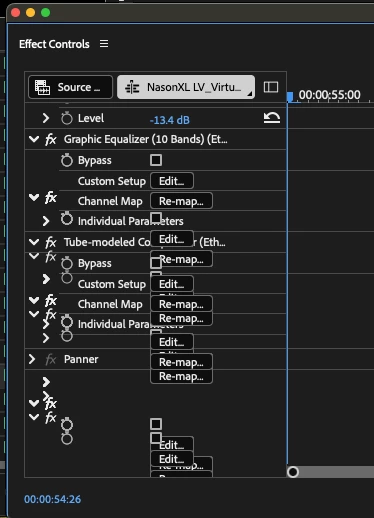
 As you can see, the text is out of alignment, and it's impossible to work with.

Using MacBook Pro M2Max. 32g ram. Last version was fine and did not do this. Even if I stretch the panel across the screen, it doesn't re-draw itself.


See how it looks in 25.3, below. Perfect.


Thanks.

Thom

    3 replies

    Inspiring
    July 1, 2025

    it's not a mac bug, I see this on windows too - it doesn't always happen but it can happen if your panel is shrunken enough. It's not a new issue though, it's been happening for years at this point

    Known Participant
    June 25, 2025

    I had to go back to the last beta 25.3 build 64 Mac, and it works fine. Definately a Mac graphics bug in the Effects Panel.

    Here is how it looks in 25.3


    MyerPj
    Community Expert
    Community Expert
    June 24, 2025

    FWIW: I'm on PP 25.4 B54 on Win11 - 24H2, and it is appearing OK here, stretched in or out.