
Premiere Pro (beta) requires access to "Public"
I'm trying to run the beta version of premiere to try the new Enhance Audio feature on Mac. Unfortuntely, I can't because I get a permissions error when trying to start the beta version. I have had no problems with the released versions.
Version of the app
Premiere Pro (Beta) v 24.3
Platform and OS version
Mac OS 14.0 (23A344)
Basic steps to reproduce the problem
Click "Open" after downloading the beta version. Tried this versiona and the one before it.
Get this screen:
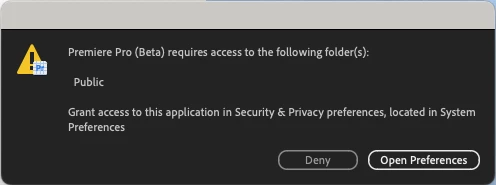
Clicking Open Preferences brings up the system dialog allowing applicationes to have access to different folders. Premiere Pro is listed and has some folders, but non named "public". All the ones listed are toggled to on. I believe the typical behavior on Mac is for the application to try to access a folder and then it popps up a system dialog for that specific folder to say yes or no to. It doesn't look like this screenshot above. Once you open preferences, it immediately tells you it must quit after changing permissions. Clicking Deny immediately says it can't run without permissions and quits.
Expected result and actual result
To open like normal with the non-beta app.


 AdChoices