



SDK Add PF_ParamFlag_UNCOLLAPSIBLE and PF_ParamFlag_UNRESETTABLE flags to help us create a better UX
At the moment, when a third-party plugin based on the AE SDK adds custom parameters, the resulting UI presented by Premiere Pro (and AE) assumes that the parameter should always be collapsible and resettable by the user.
These custom parameters may have a purely cosmetic role. It makes no sense to display a Reset button nor to allow them to be collapsed. The best UX would be if both the reset button and the twirly would be hidden. Consider for example this banner parameter that shows the product name and a "Help" button:
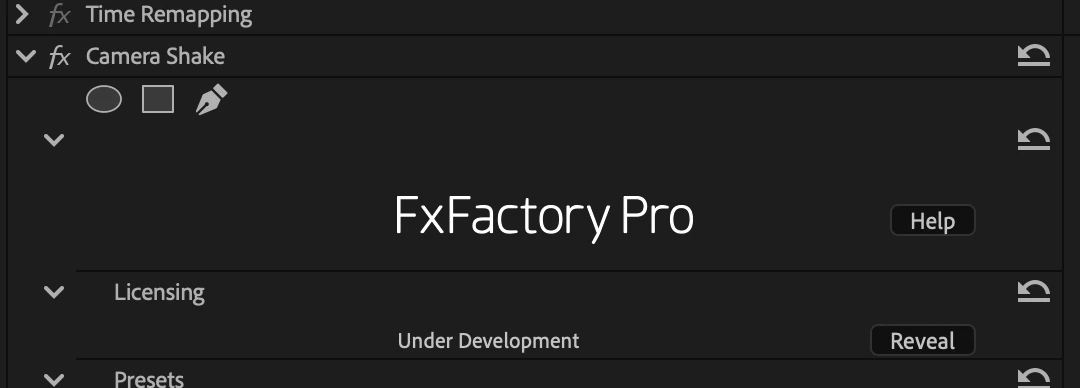
Collapsing this parameter just leaves a blank area in the inspector. Resetting it doesn't accomplish anything useful.
In some cases, our custom parameters display 'inline help' to the user that again shouldn't be collapsible or resettable:

While the above custom parameters have a purely cosmetic role, consider the following custom UI used by our plugins. It's a multiple choice parameter, advertised through icons rather than a popup menu:
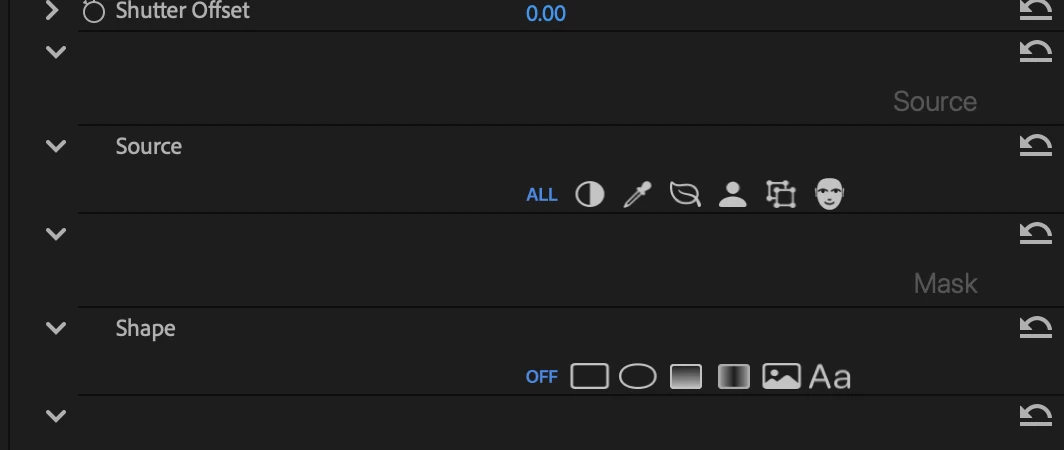
In this situation, it doesn't make sense for the custom parameter to be collapsible. It would be far better if the twirly would be hidden. If the user accidentally collapses the parameter, it actually becomes very confusing to the user, since the title area provides no "smaller version" of the same UI (which is true for native parameter types) and provides no hint that in order to customize the custom parameter, the user needs to twirl it open first:

In these and similar scenarios, another question arises: should the Title area be visible at all? Could the title be drawn above the custom content below, rather than taking that much space on its own? This is probably where opinions diverge, but it would make sense to give developers the option to hide the Title area, e.g. PF_ParamFlag_TITLE_HIDDEN. At least when it comes to our own products, there are many situations where a title is not needed. We create that parameter with an empty string as its title, and as a result there is wasted (empty) vertical space in the inspector.
Towards the primary goals described above, the SDK should add two new flags PF_ParamFlag_UNCOLLAPSIBLE and PF_ParamFlag_UNRESETTABLE to alongside the existing PF_ParamFlags. This would give plugins a way to declare to the host app that the custom parameter area should never be collapsible (and thus the host app should hide the twirly) and to ask for the Reset button to be hidden, again because there is no actual/important data to be reset.
Thank you!
 AdChoices