
S0oulFrame
Participant
May 27, 2026 4:13 PM UTC
Open for Voting

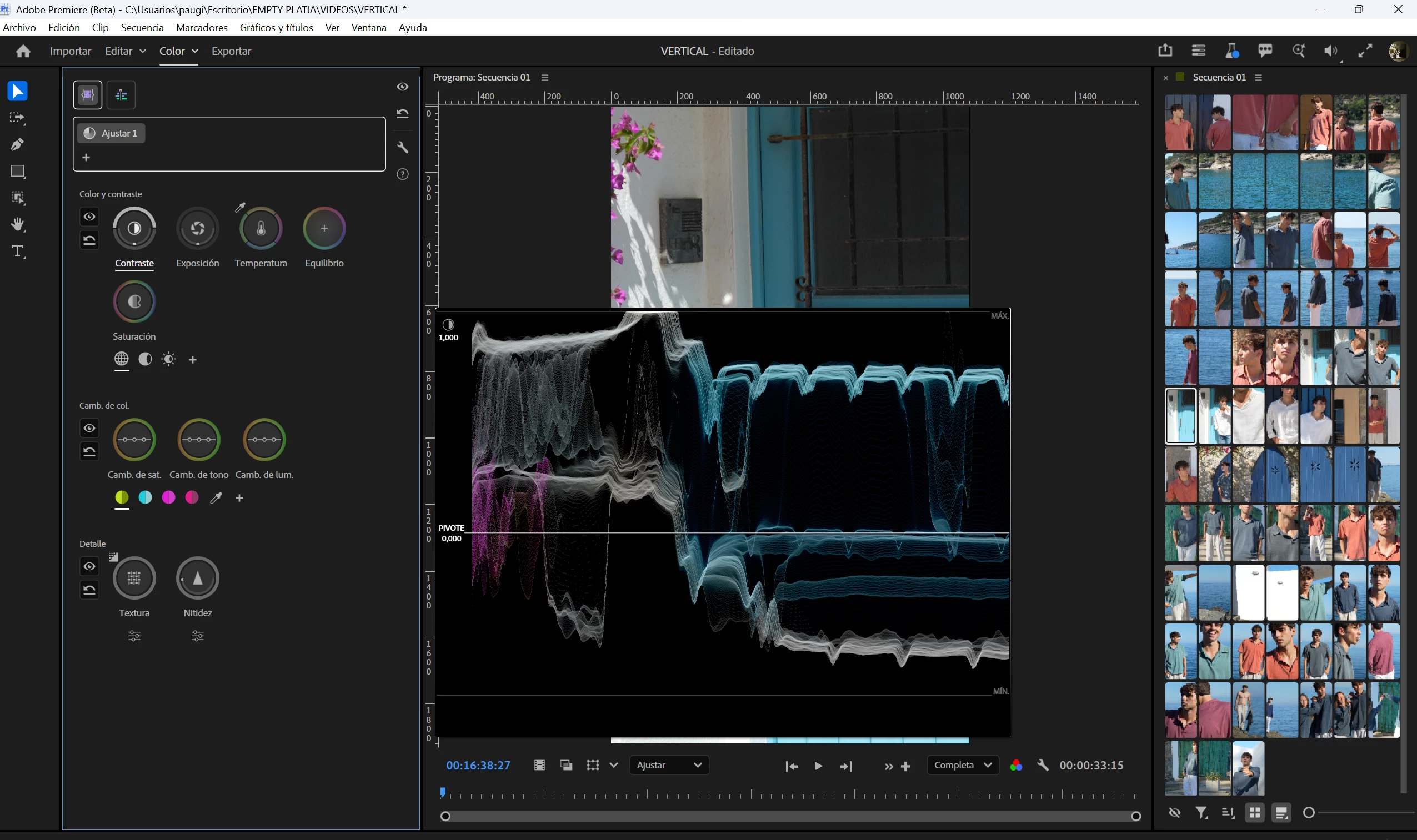
The new color mode is a disaster.

Who was the genius who designed this disaster…? There’s way less precision for selecting exact values compared to Lumetri Color. One wrong mouse movement and you instantly lose the value you had before… it’s simply a disaster. And don’t even get me started on what happens if you organize your workspace for editing vertical videos. What the hell does it mean that the moment you start editing, you can’t even see your clip anymore? Someone explain that to me… Extremely disappointed.


    8 replies

    Participating Frequently
    Nov 11, 2026 6:14 AM UTC

    I agree 100%

    Translate
    R Neil Haugen
    Legend
    Nov 11, 2026 7:21 AM UTC

    If you haven’t been watching this develop and playing with it in the public beta, your reaction is entirely normal and predictable. So I’ll give some information as someone with rather a lot of time working with this.

    The designer is one of the most amazing and knowledgeable minds on color correction and controls in all pro video … he didn’t just write “the book” on color correction, he wrote several of them. Also, he wrote the entire 4,000 page manual for several Resolve versions while he worked for BlackMagic Design. They guy’s flipping brilliant and very professionally experienced.

    On first sight in the beginning of the private beta, I thought it a mess too. However, after more tools were added and I came to understand why it’s designed as it is, I found that it was both powerful and blazing fast to work with.

    But … you have to relearn how to mentally approach color correction. After that, it’s really an amazing tool. Not fully done yet, but far more capable than Lumetri ever was. And with color science well past anything in Lumetri.

    And there are very few people that could push Lumetri farther than me. I had a good time doing things with it that professional colorists insisted weren’t possible. But … the amount of work and time that took was not pleasant. Nor professionally sustainable.

    Translate
    Everyone's mileage always varies ...
    Participating Frequently
    Nov 11, 2026 7:59 AM UTC

    Ben Smith (Senior Staff Product Designer at Adobe) led the design of the new Color Mode panel in Adobe Premiere 27.0, working under the overall leadership of Alexis Van Hurkman (Principal Product Manager and color grading architect).

    Translate
    IanB_360
    Community Manager
    Community Manager
    May 27, 2026 7:16 PM UTC

    Hi ​@S0oulFrame 

    Welcome to the Premiere community. Thank you for taking the time to report a problem. It would help us if you could use the link " How to Report a Problem," which provides steps to provide more information that can help us identify the issue. 
    Here to help
    Ian

    Translate
    S0oulFrame
    Participant
    May 27, 2026 8:45 PM UTC

    No problem, thank you for your attention.

    Translate
    R Neil Haugen
    Legend
    May 27, 2026 5:59 PM UTC

    Hey, please post critiques! They need them ... and I sure post critiques and outright criticisms too. Clearly, some staffers are not sure what to do with me as I’ve never been a corporate type, always been self-employed. And always been rather more direct than most. They’ve survived ... ha.


    It is radically different, by intent ... and it can take some time to really start understanding how to re-think everything you do, in order to actually start working in the way this can do. Which seems a bad thing at first. 


    But ... after you get the mental paradigm shift, Alexis has created something that even major colorists are pretty darn impressed with. It needs a ton of added functions, yessiree Bob ... and please point out what you think is missing.


    But also, take a few minutes now and then to push it around a bit. For instance ... I think everyone in the private beta initially objected to contrast being the first control and exposure the second. We were wrong, Alexis was right.


    Contrast is both contrast and setting the pivot point, the center of the operation to expand or compress image data. And ... when you get used to what this can do, and how quickly, intuitively, and efficiently it can do what it does, for the majority of clips, you probably won’t need to even touch the Exposure control.


    Which seemed weird at first ... as Exposure in this, like Contrast, is a two-function tool: you control both Gain and Black point setting in one control.


    But the way the contrast works, with a built-in sliding curve at the top and bottom of the ‘scale’,  it is amazing how fast you can shape an image. I don’t use Exposure on more than about 20% of the clips I work now. I don’t need it ... the total range and black point and fall-off got set with Contrast.


    The hue shaping tools are simply delicious ... after you get used to them. And the Details/Texture controls are simply the niftiest addition we’ve had in some time. I’ve missed that, as I work in Resolve a lot, which has good ‘texture’ controls. Finally, Premiere has them.


    I could list what it still needs but that’s too long a read, and they’re all on the way eventually anyway.

    Translate
    Everyone's mileage always varies ...
    R Neil Haugen
    Legend
    May 27, 2026 5:02 PM UTC

    You’re right, it’s totally different and especially initially, totally confusing.


    It’s also a partly finished beta testing process, with a ton of things yet to come as has been said over and over. It’s not done yet!


    The genius behind this beta process ... which is not nearly in final “imagined” form ... is Alexis Van Hurkman, and if you don’t know that you haven’t read anything about it apparently.


    I was one of the first in the private beta ... and my initial reaction, when we had only the first contrast/exposure/balance group of operations ... was what in the world is this hot mess.


    What it has become, as it’s being fleshed out over time, is a vastly different and very powerful, if entirely new process for handling color and tonal manipulations in video post processing. Designed for use in the 90-95% of pro produced media, that isn’t headed to major network broadcast or streaming channels. Where time and cost are critical.


    I have been working in testing/advising on video post color for some time, including paid to teach pro colorists. I work with a full Tangent Elements panel in my office, and do testing for them also. And at NAB, spend most of my time with rather noted colorists. Who I might note, tended to be pretty impressed with what this does so far in light of what is also coming to it.

    Translate
    Everyone's mileage always varies ...
    S0oulFrame
    Participant
    May 27, 2026 5:25 PM UTC

    Even though what you’re saying is true, and even if it’s still a beta, mistakes are there to be criticized. If we keep pretending everything is beautiful, we’ll keep having the same problems as always. And damn… the fact that the very first time I touch the new mode I immediately run into issues like these… really leaves a lot to be desired.

    Thanks for your reply.

    Translate