Participating Frequently
June 29, 2025

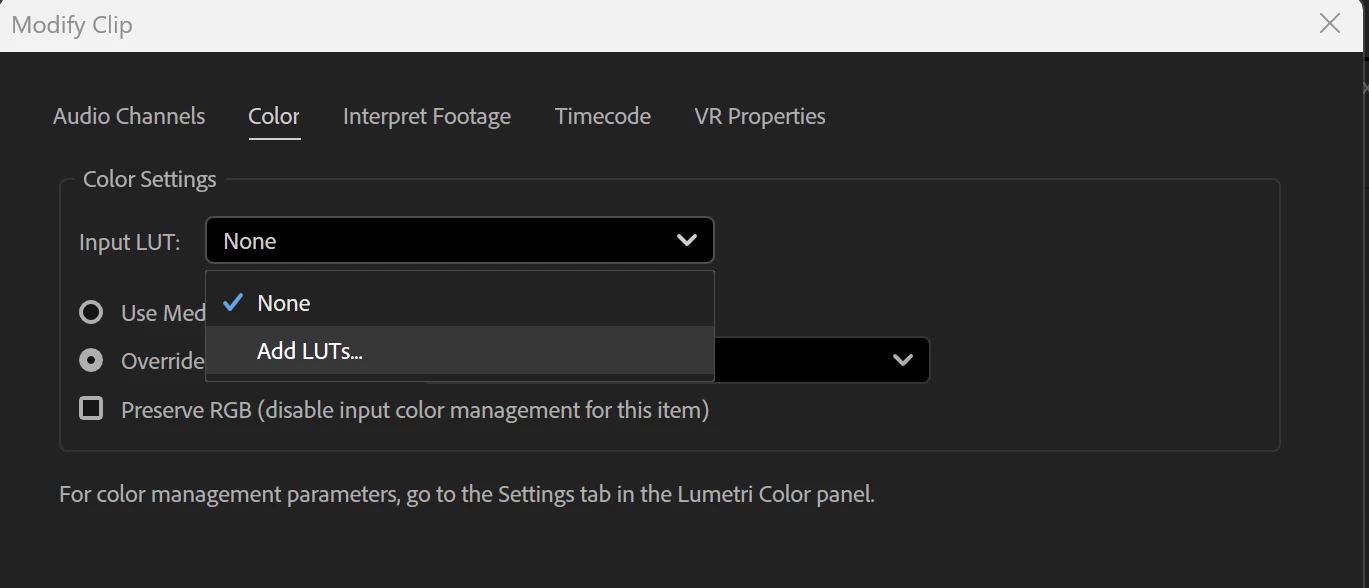
Unable to add LUTs in color settings

  • June 29, 2025
  • 7 replies
  • 337 views


All my previous LUTs have disappeared from here, and adding them again doesn't work.


V25.4 (build 68)

    7 replies

    Participating Frequently
    July 7, 2025

    Awesome thank you! It's working with them in the input folder, never had to do any of that before.


    I guess it's still open because the "Add LUTs" option from the dropdown does absolutely nothing.

    R Neil Haugen
    Legend
    July 6, 2025

    The folder name matters ... the LUTs in a folder named Technical will appear in the dropdown for the Lumetri Basic tab.


    LUTs in a folder named Creative will show in the Creative tab.


    Input as the folder name get's Input use.

    Everyone's mileage always varies ...
    Participating Frequently
    July 6, 2025

    Still no good


    Participating Frequently
    July 6, 2025

    Thanks, i'll try that, doesn't explain why they where fine for over a year and i can't add them in them same way again.

    R Neil Haugen
    Legend
    July 5, 2025

    There are two places built into their system where users can place LUTs for different tab usage within Lumetri, and have the LUTs be seen by the apps ... all three ... Premiere, AfterEffects, and MediaEncoder.


    Staffer @Kevin-Monahan posted a good FAQ on the forum about this ...


    https://community.adobe.com/t5/premiere-pro-discussions/faq-premiere-pro-lumetri-color-custom-lut-directory-and-location/td-p/4785911


    Everyone's mileage always varies ...
    Participating Frequently
    July 5, 2025

    F:\Leeming luts 

    There's about 60 .cube files in there. 

    They have always been in there, it was never a problem until one day they vansihed from Premier Pro, I can use them fine in the Lumetri Color effect. but thats a pain.

    R Neil Haugen
    Legend
    June 30, 2025

    Where specifically are you  parking these on your computer? The full details of the folder tree and folder names, please ...

    Everyone's mileage always varies ...