Participant
June 2, 2026

Relative Canvas Size can't be 0

  • June 2, 2026
  • 1 reply
  • 29 views

In the Canvas Size dialog, with “Relative to current dimension” checked, the width nor height can be set to 0. This is a big problem if you only want to change one dimension.
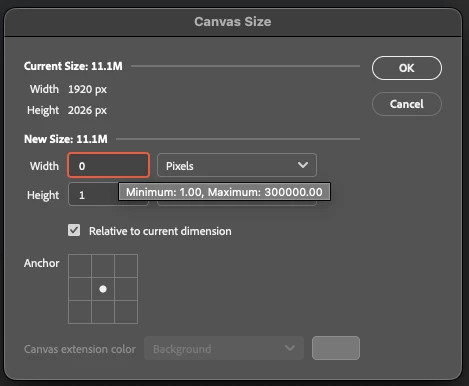
Also, I will say that it is very annoying that the up and down arrow keys no longer increase and decrease the value by a whole number.

    1 reply

    D Fosse
    Community Expert
    Community Expert
    June 2, 2026

    Yes, this is wrong and clearly a bug. I seem to remember there’s been a thread or two about this before, but I normally never use Relative, so I haven’t paid attention until I tested it now.


    • If you set 1, even with the anchor to a side so that it should add a full pixel row, nothing changes. In other words, 1 = 0.
    • But 2 still = 2.
    • So the net result is that you cannot add one pixel row. It has to be two. 


    If you uncheck “modern user interface” in preferences, it works correctly.

    Participant
    June 2, 2026

    I think for this and many other reasons, I will be very excited when a few projects are wrapped up and I can leave Adobe products behind for the better, cheaper competitors 😁

    Participant
    June 2, 2026

    Oh I don’t expect 100% bug-free software. But Canvas Size has been around and working since version…1??? I dunno. I’ve used it reliably since version 3 anyway. Now they are introducing new bugs to working things, it’s expensive, bloated, inconsistent, messy… I could go on. As I said, “many other reasons.”

    The most serious one for me so far is the Export module - but as long as Save For Web is still around, I’m fine.

    A-yup. 🫶