



SerQQ
Known Participant
October 7, 2023
Released

Shelves with pre-prepared nodes

  • October 7, 2023
  • 17 replies
  • 1712 views

A panel with “shelves” like in Houdini.

This is a super useful tool.

That is, presets with pre-prepared nodes.
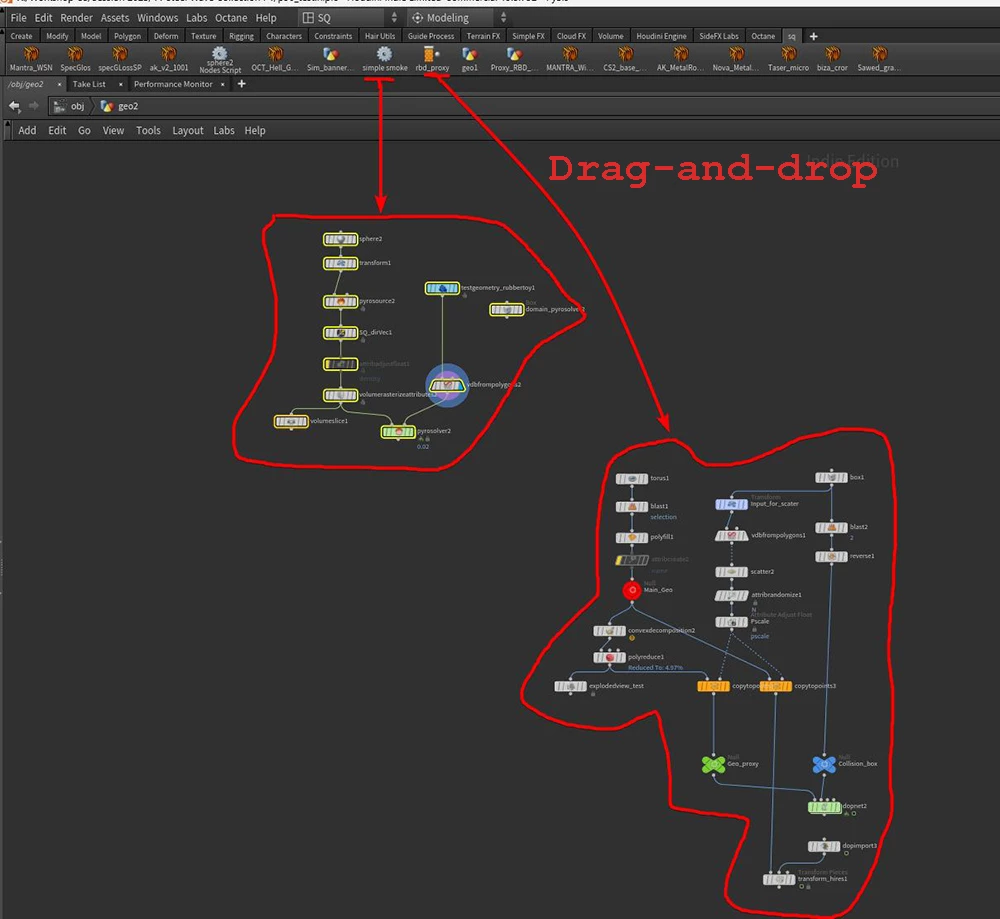


I VERY often have to create 3-6 nodes in a row with almost the same settings (not default). And I have long dreamed that in one click I could create chains of prepared nodes using my settings

    17 replies

    Cyril Dellenbach
    Community Manager
    Community Manager
    September 29, 2025

    Thank you for your patience everyone!


    This feature is now released with the official Substance Designer Plug-in: Node Snippets. You can find it in the Creative Cloud's Marketplace (for free obviously)!


    Best regards,


    Cyril Dellenbach (Micro) | QA Support Artist | Adobe
    Cyril Dellenbach
    Community Manager
    Community Manager
    July 23, 2025

    To be fully honest, we have an internal version of it, but for reasons I can't mention here we can't release it yet. I agree, it is very frustrating it's not out yet (trust me, it is frustrating for us too) and it's starting to be a bit ridiculous to say "it will be available soon!", but it should be available soon (this year).


    In the meantime, Thank you @Marco Vitale to offer your help! We're always happy to see artists creating their own tools!


    Best regards,


    Cyril Dellenbach (Micro) | QA Support Artist | Adobe
    Community Expert
    July 23, 2025

    Hey SerQQ,

    I made a plugin a while ago, for exactly this functionality.


    It doesn't use groups of nodes, you have to create a subgraph as suggested by davescm but it works quite well.

    The plugin works very intuitively (at least I think so ;-)):

    • You greate a subgraph or use an existing graph
    • drag it into your current graph
    • select it and click on the small "+" icon in the toolbar to add this graph to your favourites
    • next you get prompted to assign a thumbnail for the toolbar icon (you can skip this, if you don't want to assign a icon to your favourite)
    • then a new icon in the toolbar is created, where you can just click on and the subgraph gets placed in the current graph


    The User Interface is very simple and far from done. It also hasn't been tested extensively, that's why I didn't publish it yet. But if you want, send me a message and I send you a download link as well as a short instruction video, so you can be my beta-tester and get back with some feedback.


    Stay healthy and creative Marco

    SerQQ
    SerQQAuthor
    Known Participant
    July 23, 2025

    Checking in on this idea from 2023.

    I was disappointed to see that this feature still wasn't included in the new major release, version 15.0. After two years, it's disheartening that a feature which could significantly improve the workflow has not been implemented.


    Is there any update on the status of this proposal? Is it being considered for a future release?


    Thank you

    Nicolas3D
    Community Manager
    Community Manager
    January 14, 2025

    it's coming soon, stay tuned 🙂 

    SerQQ
    SerQQAuthor
    Known Participant
    January 14, 2025

    You said a few months, from what date?

    And it's already 2025.

    Luca Giarrizzo
    Community Manager
    Community Manager
    August 28, 2024

    Hello,


    This feature is coming, and be sure you will not have to wait a whole year for it! It is a matter of months now.

    Thank you for your patience!


    Luca Giarrizzo | Quality Engineer - Substance 3D Designer | Adobe
    SerQQ
    SerQQAuthor
    Known Participant
    July 31, 2024

    I was eagerly looking forward to this feature in the new update. I was very disappointed when I didn't see it in version 14.0.

    It turns out the next update will be in a year?


    SerQQ
    SerQQAuthor
    Known Participant
    February 28, 2024

    Cool!

    Thank you

    Look forward to

    Cyril Dellenbach
    Community Manager
    Community Manager
    February 28, 2024

    We're currently working on a similar feature.


    Regards,

    Cyril Dellenbach (Micro) | QA Support Artist | Adobe