



johnrellis
Legend
April 5, 2018
Open for Voting

P: Add Rec 709 to LUT color spaces in new enhanced profiles

  • April 5, 2018
  • 27 replies
  • 7521 views

The new enhanced profiles can include LUTs, but the most common color space for existing LUTs, Rec 709, is omitted: 
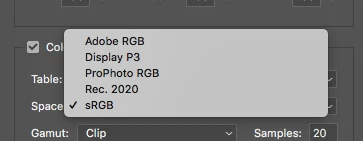


There are thousands of Rec 709 LUTs available for video color grading, and allowing Rec 709 LUTs in enhanced profiles would let people achieve the same look for their video and still images.

Note that it would be necessary to include two versions of Rec 709 for gamma 2.2 and 2.4, since those are both widely used.

27 replies

johnrellis
Legend
April 8, 2018
The color space specified by Space refers to the color space on which the LUT is defined to operate.  So if you select Rec 2020, then the LUT will be assumed to take as input color numbers in Rec 2020 and produce as output color numbers in Rec 2020.

I believe that internally, ACR transforms that LUT to operate on color numbers in the internal working space of ACR (Melissa RGB, a variant of ProPhoto RGB). But I haven't verified that yet.
TheDigitalDog
Inspiring
April 7, 2018
Thanks ; more and more, 3DLUT creator seems like the best option for me.
Author “Color Management for Photographers" & "Photoshop CC Color Management/pluralsight"
cameronr35693364
Participating Frequently
April 7, 2018
Also Lattice isn't a WYSIWYG freeform LUT editor like 3DLUTCreator. By that I mean it's not such that one can select a range of colors and modify them. It's more a GUI for LUT math. Similar to LUTcalc https://cameramanben.github.io/LUTCalc/LUTCalc/index.html but in my opinion far more intuitive and provides a bit more options. 
cameronr35693364
Participating Frequently
April 7, 2018
Andrew, if you're comfortable with command look into this. From the creator of Lattice.

https://github.com/gregcotten/pylut

https://www.jasonmyres.com/converting-3d-luts-for-resolve-lustre-and-nuke-using-pylut-in-osx
cameronr35693364
Participating Frequently
April 7, 2018
I agree. I commented on Julieanne Kost's blog post about it as well. http://blogs.adobe.com/jkost/2018/04/lightroom-cc.html

Copy/Pasting my comment from the post:

Question about the LUTs in the SDK. In regards to Space and Clip/Extend. What specifically is this referring to? The RGB data being input, output?

For instance if I have a LUT that converts Rec709 Gamut/sRGB Gamma -> Rec709/Cineon > Kodak 2383/Rec709 Emulation would I select space: srgb/clip?

Basically do I need to make my LUT loop back into whatever colorspace I define in ACR? For instance ProphotoRGB/Gamma 1.8 -> Rec709/Cineon -> Kodak2383/Rec709 Emulation -> ProphotoRGB/Gamma 1.8.

How does ACR/LR interpret the RGB data after it’s run through the LUT?

I assume it has to process the data from LR Internal working space > some RGB > LUT > Interpret RGB DATA > Convert for display icc.

I feel like it’d be useful to add a couple parameters that define how to encode the RGB data going into the LUT and another for how to interpret the output data from the LUT. A few standard ones can be:

LUT Input Space (This is the data fed into the LUT/Exported out of ACR):

Rec709/Cineon Log
Rec709/sRGB
Rec709/Gamma 2.4
Rec709/Rec709 Gamma
P3D65/Gamma 2.6
P3D60/Gamma 2.6
P3D65/sRGB (DisplayP3)
ACESCG/Gamma 1.0
ProphotoRGB/Gamma 1.0
ProphotoRGB/Gamma 1.8
ProphotoRGB/sRGB

LUT Output Space(This is the data fed out of the LUT/Interpreted by ACR):

AdobeRGB/Gamma 2.2
Rec709/sRGB
Rec709/Gamma 2.4
Rec709/Gamma 2.2
Rec2020/Gamma 2.4
P3D65/Gamma 2.6
P3DCI/Gamma 2.6
P3D60/Gamma 2.6
P3D65/sRGB (DisplayP3)
ProphotoRGB/Gamma 1.8
ProphotoRGB/sRGB

Thanks so much!
TheDigitalDog
Inspiring
April 5, 2018
Thanks, interesting video's on Lattice. I have to see if the $99 version of 3D LUT creator is going to cut it for starting out or, their Standard version which is on par price wise with Lattice:
https://3dlutcreator.com
Author “Color Management for Photographers" & "Photoshop CC Color Management/pluralsight"
johnrellis
Legend
April 5, 2018
I don't have any experience with 3D LUT Creator.  I've used Lattice a little for technical transforms of LUTs. 
TheDigitalDog
Inspiring
April 5, 2018
Very interesting, thanks!
Obviously I need to dig into LUT's and creation a lot more know that we have such features in ACR/LR. I'm toying with buying 3D LUT Creator; are you familiar with it and if so, is the entry level ($99) version sufficient? 
TIA.
Author “Color Management for Photographers" & "Photoshop CC Color Management/pluralsight"
johnrellis
Legend
April 5, 2018
As an indication of the need for Rec 709, this LR feature request for the ability to use LUTs in LR has 97 votes:
https://feedback.photoshop.com/photoshop_family/topics/id_love_to_get_the_ability_to_use_3d_luts_in_...
johnrellis
Legend
April 5, 2018
"So what happens if the color space isn't in sync? That is, you pick sRGB or ProPhoto but you want Rec 709? Like with ICC profiles, does that screw up the color appearance?"

Yup.  

sRGB is pretty close to Rec 709, with the same primaries but modestly differently gamma encoding.  A Rec 709 LUT applied to an sRGB image will often / usually result in an image acceptably close to that LUT applied to the Rec 709 version of the image, though I can often see differences in the shadows, as you'd expect.

"if you use such a LUT, does one have to use them only on images that are in the same color space (seems that wouldn’t be necessary with raws that have to be encoded into something at some point)."

No, the enhanced profile containing the LUT can be applied to any image that ACR / LR can read.  Looking at the profile's .xmp file, the color space isn't recorded anywhere, just an encoded LUT.  I'm guessing that encoded LUT represents the specified LUT, converted to the working space of ACR (MelissaRGB).