


Roei Tzoref
Legend
February 6, 2018
In Development

P: Camera Raw adjustments in context of other layers

  • February 6, 2018
  • 40 replies
  • 9702 views

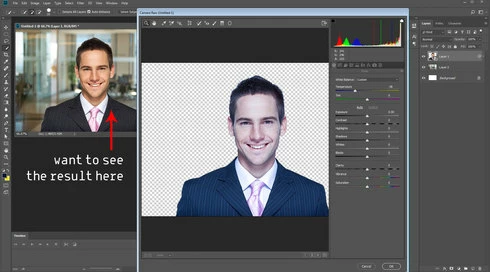
currently when you use the amazing camera raw on a layer, it opens a separate interface which is great, but... alas, if you are in need of color matching you are facing a problem because you can't see the color correction in the composite psd document until you close camera raw.

if camera raw could be applied in both windows or have a view of the composite in camera raw as one of the views at the bottom this would be amazing. (btw, spliting the views with a way to actually move the split vertically or horizontally and not the layer would be nice)

if you want an example this is same as a color correction is applied to layers as an effect in after effects.
40 replies

PECourtejoie
Community Expert
Community Expert
May 24, 2022

@Tom HM please invite other users of any astrophoto forum you might visit to vote in this thread, and explain why you need this feature. The new masking abilities might make this request even more pressing!

Participant
May 18, 2022

Great to hear that this feature is planned! I actually only found this page as a result of Googling how to do this. As someone who uses PS for astrophotography, I use a lot of adjustment layers to work from the darkest areas of raw files. The ACR preview image is a million miles away from the finished edit. So much so that I often can't even get an idea of the changes until I hit apply.

trashcaneron
Inspiring
March 30, 2022

Dear god this is necessary. Please please please! 

Jo97d
Participant
December 20, 2021

Hi everyone ، i have a simple question...


Can I show or hide some layers in camera raw filter to can see the difference directly inside camer raw fllter, can I control which layers are included in the effect from within the filter?


I have a project and I would like to make an effect on part of it (a layer), but at the same time I would like to see the change in all the project from within the filter directly before applying it, is that possible?  Is there an option inside the filter that allows me to display the selected part in addition to the rest of the image?


"Sorry for my google translate language 😁"

PECourtejoie
Community Expert
Community Expert
December 21, 2021

Hello, I'm merging your post for a request to get that function that does not yet exist, but would be so useful, I can't understand it's not yet available.

Please vote on top of the thread.

Rikk Flohr_Photography
Community Manager
Community Manager
December 16, 2021

Update Status

Rikk Flohr: Adobe Photography Org
Inspiring
March 10, 2021

After 3 years can we imagine having this feature which could be a game changer for image compositing. Moreover this function is already present on affinity photo.

Inspiring
September 28, 2019
As a freelance retoucher, the camera raw filter on a smart object gets used on 99% percent of my files. having it open in a new window, make my adjustments and then close to see the result mixed with other layers, is slow and sluggish. Being able to see the adjusments with all other labels would be huge for speeding up my workflow. 
Earth Oliver
Legend
September 28, 2019
any day now?
Earth Oliver
Legend
September 28, 2019
we're still waiting!
Inspiring
September 28, 2019
This would be just great!