


Open for Voting
P: More precision in the geometry tab
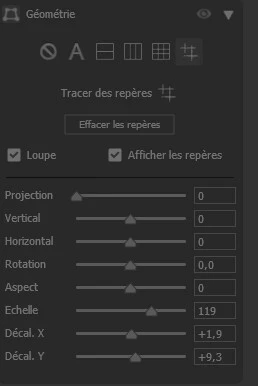
In Camera Raw, it would be nice to have more precision in the Geometry tab when you want to shift an image along the X or Y axis. Using the slider to the right or left with a mouse isn't precise at all. Ideally, you should be able to increment the values by +0.1 or -0.1 using the <- or -> keys on the keyboard.
The “Constrain to Image” checkbox should also be moved back to where it used to be, right next to the Magnifying Glass checkbox. Since the latest version, you have to right-click on the photo and select “Constrain to Image,” which is sometimes grayed out even though it should be active. This is truly an incomprehensible regression.
 AdChoices