


P: Auto position brush tool across photos
If you copy the editing settings to another photo, the healing tool and the masking tool are also copied. However, they will be inserted in exactly the same place, even though the subject is in a slightly different place in the photo. Example: Use the masking tool to lighten the eye sockets slightly to conceal the dark circles. But if you transfer the settings from this photo to the next portrait, the masking tool may lighten the eyebrows or the forehead instead of the eye sockets.
The same applies to the repair tool, which retouches away the rubbish bin in the background, but then does not recognise the slightly changed position of the rubbish bin in the next photo, but instead bluntly uses the same position.
It would be perfect if the tool analysed the image and adjusted it accordingly so that it intelligently places the tool instead of transferring it 1:1 without context.
Example: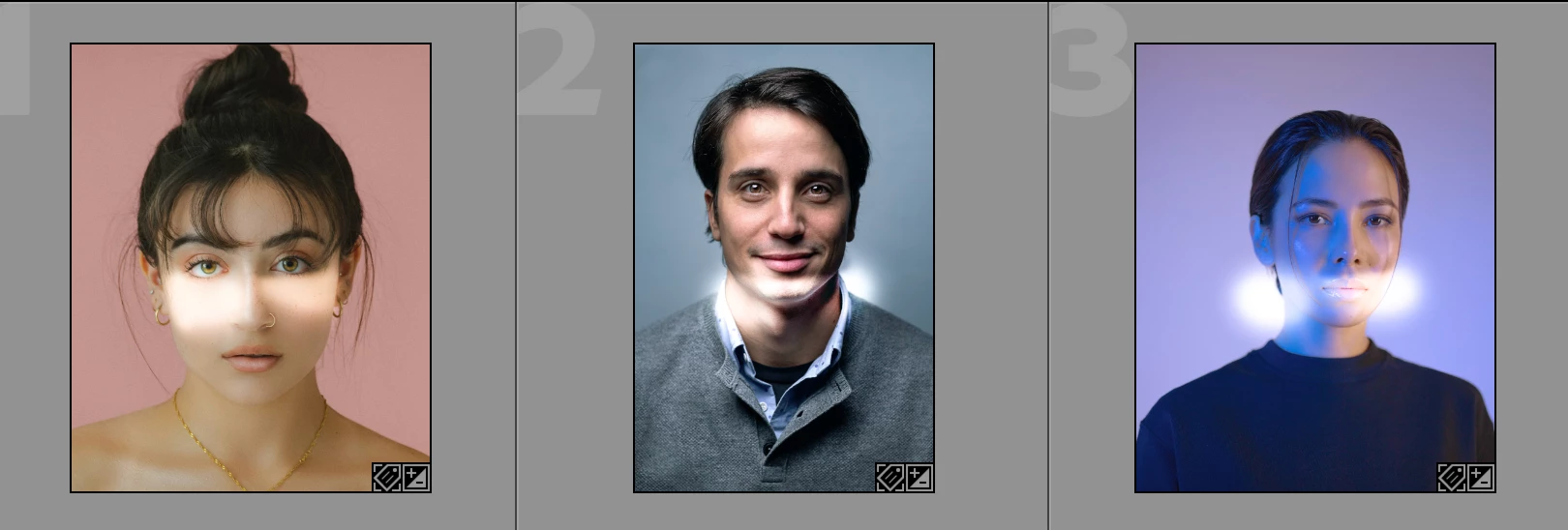
Instead of tracking them and applying it at least to the right position. Adjusting the shape and size will be next AI level. But just tracking it, like premiere can do, would help so much in a set of portraits.
 AdChoices