


Known Participant
July 9, 2025
Open for Voting

P: Entire face mask selection

  • July 9, 2025
  • 1 reply
  • 104 views

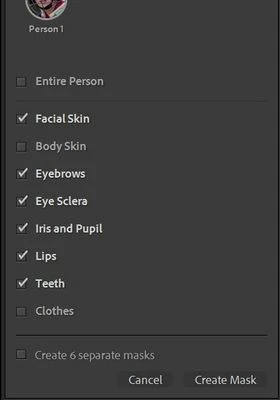
When creating a mask for an identified person it is of course great being able to create separate or combined masks for the individual facial elements - lips, eyebrow, sclera etc . While there is an option to select the entire person, there is no option to select all of the identified facial elements with one click. I often find myself having to click 3 or 4 elements on each of a sequence of shots to select the whole face (eg a sportsperson wearing a helmet) although the elements available will vary with each shot and so syncing the mask is fraught with risks. The additional feature would simply be to have an "Entire face" box below the "Entire person" box. Thanks


1 reply

ArcherA4Author
Known Participant
September 18, 2025

A useful workround for my own question/request...

Using an appropriate clear full face shot you can select all of the facial elements available and then save it as a Preset 

One click will apply that mask to future photos and it will pick up all and only those elements that the AI can identify (ie was going to identify anyway in that particular photo)

Claire H.
Community Manager
Community Manager
September 18, 2025

Thanks so much for sharing your idea! Also, if you think others might benefit from this too, feel free to encourage them to upvote or add their thoughts in the comments. The more context and support a request has, the better! Thanks again for being part of the community! ^CH