

johnrellis
Genius
April 25, 2024
Released

P: Export hangs indefinitely with corrupt files rather than producing an error message

  • April 25, 2024
  • 18 replies
  • 3465 views

When LR tries to export a photo that's corrupt, the export hangs and never completes. It should produce an error message instead.


Worse, there isn't a way for a plugin to detect and recover gracefully. The call to rendition:waitForRender() will never return, even after the user cancels the corresponding task in the progress bar. Several of my plugins rely on exporting photos, e.g. Any Vision.


To reproduce on LR 13.2 / Mac OS 14.4.1:


1. Download this tiny catalog:

https://www.dropbox.com/scl/fi/48dtex70opjseeyhsm0hn/corrupt-bug.2024.04.25.zip?rlkey=hrf6fsoogaklqw77so3n723a0&dl=0


2. Copy the script "corrupt-bug.lua" from the catalog folder into the Scripts subfolder of the Lightroom settings folder.


3. Start LR.


4. Select the one photo and do File > Export, exporting it as a JPEG.  Observe that the export never completes, with the progress bar showing:
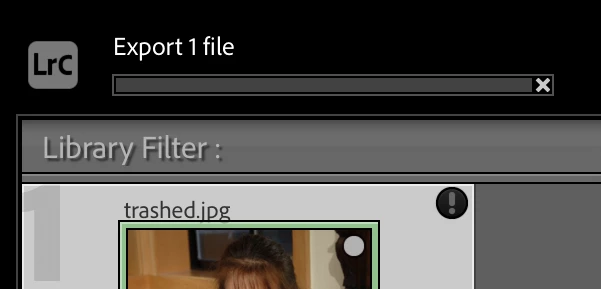
 

Also observe that the following error appears when LR is run from Terminal with the -traceback switch:


2024-04-25 18:36:11.364 Adobe Lightroom Classic[91358:6685632] openNegative: <AgErrorID>dng_error_bad_format</AgErrorID>


5. Restart LR.


6. Select the one photo and do Scripts > corrupt-bug. Observe that the export initiated by the script never completes (it should display a message when it does):
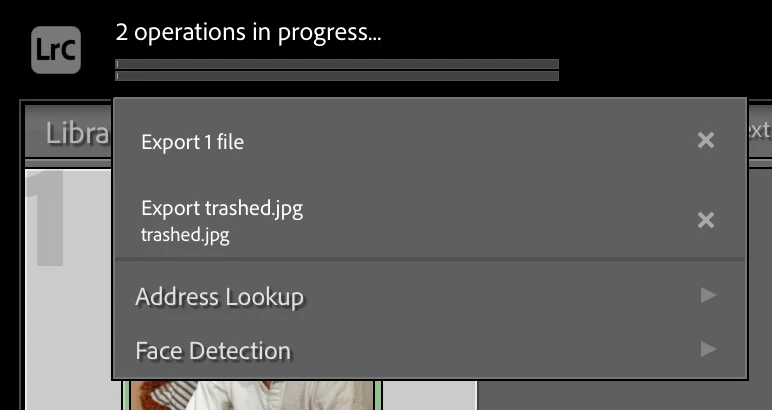
 

7. Cancel both export tasks in the progress bar by clicking their "x".  Observe that no dialog is displayed by the script, indicating that the call to rendition:waitForRender() has never returned, even though the export has been cancelled.


18 replies

johnrellis
Genius
July 22, 2024

@Evelina5EC9, please do these troubleshooting steps:


1. Select one of the problem photos that isn't exporting and do Metadata > Save Metadata To File. Do you get an error message? 


2. Go to Develop with that photo -- do you get an error message?


3. Temporarily set Preferences > Performance > Use Graphics Processor to Off. Try exporting that problem photo -- does it work now?

Participant
July 22, 2024

Export bar works, but nothing is exported 🙂 and it's not for all photos.. part of them don't get exported

Participant
June 22, 2024

I am having this same issue on 6/22/24! I cannot export certain .dng and .nef files from Lightroom Classic v13.3. The export just hangs. It appears to be related to the metadata being saved to the file. If I select a file and do a CMD-S (on Mac), I get an error message that the photo has been changed in an external application. If I select Overwrite Settings, I get an error, "Could not write metadata. Unknown file I/O error (1). PLEASE address this or provide a workaround.


Participant
May 23, 2024

I ended up trying moving one for those "corrupted" file to two differents Hard Drives to see if that would be the problem. Doesn't solve the problem either. 

johnrellis
Genius
May 16, 2024

Photoshop and LR have completely different code for accessing files, so it's not inconceivable that one trips over a problem and the other doesn't.  Moving a problem file to a different drive, preferably one that's internal (and thus accessed by a different data path/port/hub/cable), is a good test. 

Participant
May 15, 2024

So recently, some of pictures won't get exported. The progression bar just doesn't progress. The weirdest is that it works with similar files but some doesn't work at all. Alternatively I can open it for Edit in Photoshop and export it from there, but it slows down my workflow drastically. My original test files are .DNG files, it seems to work well with jpegs. Export always in jpegs. 


My System Infos : 

Lightroom Classic version: 13.2 [ 202402141005-bf1aeb84 ]
License: Creative Cloud
Language setting: en-DE
Operating system: Mac OS 14
Version: 14.4.1 [23E224]
Application architecture: arm64
Logical processor count: 8
Processor speed: NA
SqLite Version: 3.36.0
Built-in memory: 16.384,0 MB
Dedicated GPU memory used by Lightroom: 38,7MB / 10.922,6MB (0%)
Real memory available to Lightroom: 16.384,0 MB
Real memory used by Lightroom: 660,1 MB (4,0%)
Virtual memory used by Lightroom: 407.526,7 MB
Memory cache size: 118,7MB
Internal Camera Raw version: 16.2 [ 1763 ]
Maximum thread count used by Camera Raw: 5
Camera Raw SIMD optimization: SSE2
Camera Raw virtual memory: 737MB / 8191MB (9%)
Camera Raw real memory: 737MB / 16384MB (4%)

Cache1:
Final1- RAM:130,0MB, VRAM:5,0MB, Vietnam_Jan2024-L1005775-016.DNG
Final2- RAM:129,0MB, VRAM:2,0MB, Vietnam_Jan2024-L1005754-001.DNG
Final3- RAM:129,0MB, VRAM:2,0MB, Vietnam_Jan2024-L1005944-169.DNG
NT- RAM:388,0MB, VRAM:9,0MB, Combined:397,0MB

Cache2:
final1- RAM:107,0MB, VRAM:0,0MB, Vietnam_Jan2024-L1005944-169.DNG
final2- RAM:107,0MB, VRAM:0,0MB, Vietnam_Jan2024-L1005775-016.DNG
final3- RAM:107,0MB, VRAM:0,0MB, Vietnam_Jan2024-L1005754-001.DNG
T- RAM:321,0MB, VRAM:0,0MB, Combined:321,0MB

Cache3:
m:118,7MB, n:1.525,0MB

U-main: 102,0MB

Standard Preview Size: 3360 pixels
Displays: 1) 1920x1080, 2) 3360x2100

Graphics Processor Info:
Metal: Apple M1
Init State: GPU for Export supported by default
User Preference: Auto

Application folder: /Applications/Adobe Lightroom Classic
Library Path: /Users/jeremieschuler/Pictures/Catalog Lightroom/Catalog 2024-v13.lrcat
Settings Folder: /Users/jeremieschuler/Library/Application Support/Adobe/Lightroom

Installed Plugins:
1) AdobeStock
2) Aperture/iPhoto Importer Plug-in
3) Excire Search
4) Flickr
5) LR/Mogrify 2
6) Negative Lab Pro
7) Nikon Tether Plugin

Config.lua flags: None


johnrellis
Genius
May 15, 2024

Troubleshooting steps to narrow down the issue:


1. Select one of the problem DNGs and do Metadata > Save Metadata To File. Do you get an error message? 


2. Go to Develop with that DNG -- do you get an error message?


3. Temporarily set Preferences > Performance > Use Graphics Processor to Off. Try the exports -- do they work now?

Participant
May 16, 2024

1. Yes I get the error message " Could not write metadata. Unknown file I/O error" Screen capture enclosed.

2. Nope works alright.

3. Nope doesn't change , export still not advancing. 

johnrellis
Genius
April 26, 2024

[This post contains formatting and embedded images that don't appear in email. View the post in your Web browser.]


@Rikk Flohr: Photography, thanks. Note that LR 11.0 and 12.0 handled corrupt files correctly, raising an error:


Rikk Flohr_Photography
Community Manager
Community Manager
April 26, 2024

I've asked the team to comment on this as it may not be a bug per se' but an enhancement request. If they respond otherwise, I will move it back to bugs. 

Rikk Flohr: Adobe Photography Org