



PhotoCitizen
Inspiring
April 8, 2017
Open for Voting

P: Fit thumbnails to viewport in Grid module

  • April 8, 2017
  • 9 replies
  • 419 views

In Lightroom's grid module, the thumbnails never fit exactly: either the top or bottom row extends a bit beyond the view-port so I can't see the entire thumbnail in that row. There needs to be an option to automatically size the thumbnails to fit. This way, I can click the page-down key on my keyboard to move through the thumbnails a page/view-port at a time and always see complete thumbnails.

The resizing would be based on the currently selected thumbnail size (using the slider) and the current size of the view-port .The view-port size is always smaller when all of Lightroom's panels (side, top and bottom) are expanded and larger if some of them are collapsed or if the filter bar or toolbar are hidden. The thumbnails would then be resized SLIGHTLY (either by enlarging them or shrinking them a bit) to fit the view-port size.
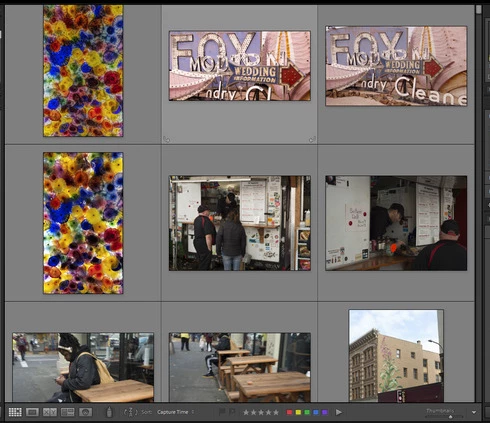

In the above image, the bottom row of thumbnails is partly hidden. This is the current behavior of Lightroom.
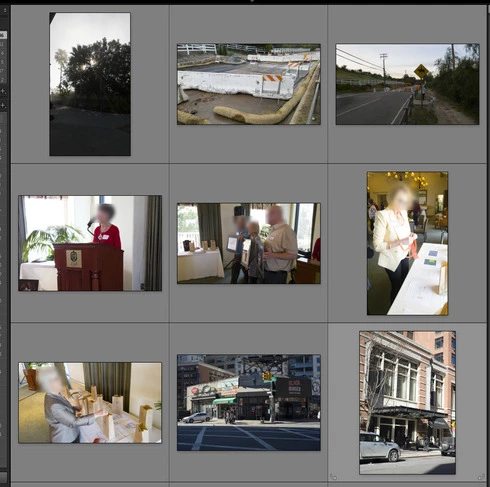

In the second image above, the thumbnails all fit and are roughly the same size as in the first image. It took me a lot of manual adjustment to accomplish this: I had to closed the toolbar and filter bar, resize the width of the side panels and adjust the thumbnail size with the slider until they fit. If I change the size of the view-port, I'll need to re-do all of these adjustments.

Please add this feature to Lightroom. I want to be able to page through row after row of images while seeing all of the thumbnails in their entirety.

Alan
AlanHaynes.com

9 replies

johnrellis
Legend
July 16, 2020
Thanks for explaining that -- never knew about it. On Mac, you have to turn off the accessibility feature using the same shortcut (it zooms the entire screen).
Earth Oliver
Legend
July 16, 2020
John, if you have a scroll-wheel on your mouse, holding ctrl-scroll resizes thumbnails.
Earth Oliver
Legend
June 15, 2020
aside from not seeing all of the thumbnail, when scrolling in the grid, it's very difficult to track images when their position constantly drifts and jumps.
The solution in Bridge simply just works. Not sure why the same hasn't been implemented in LR and i can't imagine any user who prefers seeing the first or last row in the grid always being cut off.
johnrellis
Legend
June 15, 2020
How does that work, exactly?
Inspiring
June 15, 2020
Not sure this  refers to the same topic exactly, but I VERY much appreciate being able to hold the CTRL key down while scrolling in grid view to change my thumbnail size on the fly. 

Please don't take that away in making any refinements.
Earth Oliver
Legend
June 15, 2020


Am i imagining things or did the grid view used to be locked in place while scrolling? What i mean is that while scrolling through pages in the grid, the thumbnails used to be locked in position and now when i scroll, the grid scrolls in such a way that thumbnail position drifts during scroll.
In Bridge, there's a grid-lock option which toggles the behavior i'm asking about here.
Inspiring
June 15, 2020


It would be great to have arrows at top and bottom of the vertical scroll bar to look at many  images  in the library with control.  With the draggable square it's just too coarse to allow control.   (hope I'm being clear)
Inspiring
June 15, 2020


In Adobe Bridge 2020, there is a button to "Click to lock thumbnail grid." When this is enabled, the thumbnails automatically re-size to fill the thumbnail viewing area so that there are no partial thumbnails; They all show completely. As you resize the window, or adjust the thumbnail size slider, you'll never see a thumbnail that's cut off. I've included screen grabs below. In Lightroom Classic, there is no way to do this. You'll always see partial thumbnails.

Why is the grid lock feature important? I want to be able to use my keyboard's PAGE DOWN and PAGE UP buttons to scroll through whole pages of images quickly.

Please add this simple feature to Lightroom Classic.

BRIDGE 2020 SCREENS:

Images are cut off at the bottom when grid lock is OFF.


Entire image is always seen (no cuttoffs) when grid lock is ON.
Participant
April 10, 2017


Actually, in grid mode Lightroom frequently shows incomplete pictures in the last row of a page, I mean, for example: shows 5 rows and a half, 7 and a half, etc.
Incomplete pictures also can be seen at the top of a page after pressing the PgUp / PgDn keys.

This causes a repetitive use of the scroll bar or the drag function with the Wacom tablet just to see the complete pictures.


Consider to add an option in the Lightroom configuration to avoid that situation and always show complete pictures in grid mode view.