



C.Cella
Inspiring
October 31, 2022
Open for Voting

P: Implement the options for Color Grading in the Sync/Copy and Preset creation menus.

  • October 31, 2022
  • 5 replies
  • 383 views

At today Copying/Syncing Color Grading or creating Color Grading presets is terribly limited and problematic.


When Copying, Syncing or creating a Color Grading Preset we are not given enough choices, we can only choose the entire Color Grading as it is in bulk.


Please implement these missing options options in the Copy/Sync and Preset creation menus.


[] All Color Grading 

  [] Shadows Hue and Saturation

  [] Shadows Luminance


  [] Midtones Hue and Saturation

  [] Midtones Luminance 


  [] Highlights Hue and Saturation 

  [] Highlights Luminance


  [] General Hue and Saturation

  [] General Luiminace


  [] Color Grading Blending  

  [] Color Grading Balance


• This is an Alternative shorter list of options.


[]Color Grading 

  [] 3 Way Hue(s) and Saturation(s)

  [] 3 Way Luminances


  []General Hue and Saturation

  []General Luminance


  [] Color Grading Blending 

  [] Color Grading Balance


EDIT 


This is the list of Checkboxes that we could have for Color Grading.
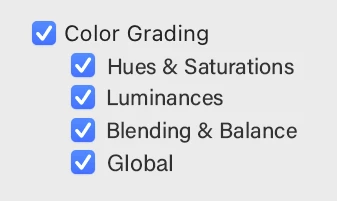


This should cover most use cases and not take much UI space AND would allow, to sync, copy and preset Color grading more efficiently.


If the user needs to sync single setting then Auto Sync will have to be used.

5 replies

Earth Oliver
Legend
October 30, 2023

yes, we've been asking for more granular options for the past 15 years. Adobe finally caved a year or so ago and updated the language and order to actually match the Develop panel, but they still haven't added additional options that allow for more specific copy settings. 
Here's a mockup i made way back in 2011 that allowed for all the settings with minimal wasted real estate:

Blows my mind that after all this time, they still can't solve this. 

C.Cella
C.CellaAuthor
Inspiring
October 30, 2023


I have updated my OP proposing a simplified set of checkboxes.


C.Cella
C.CellaAuthor
Inspiring
August 13, 2023

I bring this back.


If not implement the full set of options having 3 extra checkboxes for Color Grading would really help a lot.


Countless of times I just need to sync the Hues & Saturations, Blending & Balance but not the Luminances.


These 3 little extra checboxes would really make the difference.


C.Cella
C.CellaAuthor
Inspiring
October 31, 2022

@GoldingD 


Balance influence the results of Color Grading the most.


If you want to copy/sync only Midtones and get that very exact effect for the destination photo you need to copy balance (and to lesser extent Blending)


So a separate Balance option is necessary.


All are necessary actually.


• For Presets it's absolutely vital to be able to exclude the Luminances.


For instance.

Many of my presets have default Luminance(s) BUT if I apply them to a photo that has non default Luminance(s) then they overwrite the existing ones.


P.s.

I tired to remove the Luminance values form my XMP/Presets manually but unlike for Curves it's not possible to do that as they are written back into the XMP at default values for unknown reasons.


.

GoldingD
Legend
October 31, 2022

For Copying Settings, I agree. But the selection should be simply presenting all three options to select or not. Something like this (please excuse the rouh artwork):


For creating a preset I disagree. When creating a preset, only apply what you want in the preset to your sample image, Then create the preset with those settings, saving to a name of your choosing.