


Inspiring
November 18, 2021
Open for Voting

P:(Masking) Add Refine Subject Options

  • November 18, 2021
  • 4 replies
  • 940 views

I love the new masking in Lightroom Classic but I'd like to see an improvement in the subject selection for birds (particularly the feathers). The subject selection will select the bird but also select the areas between the splayed feathers on the wings. Can this be corrected to select only the bird?
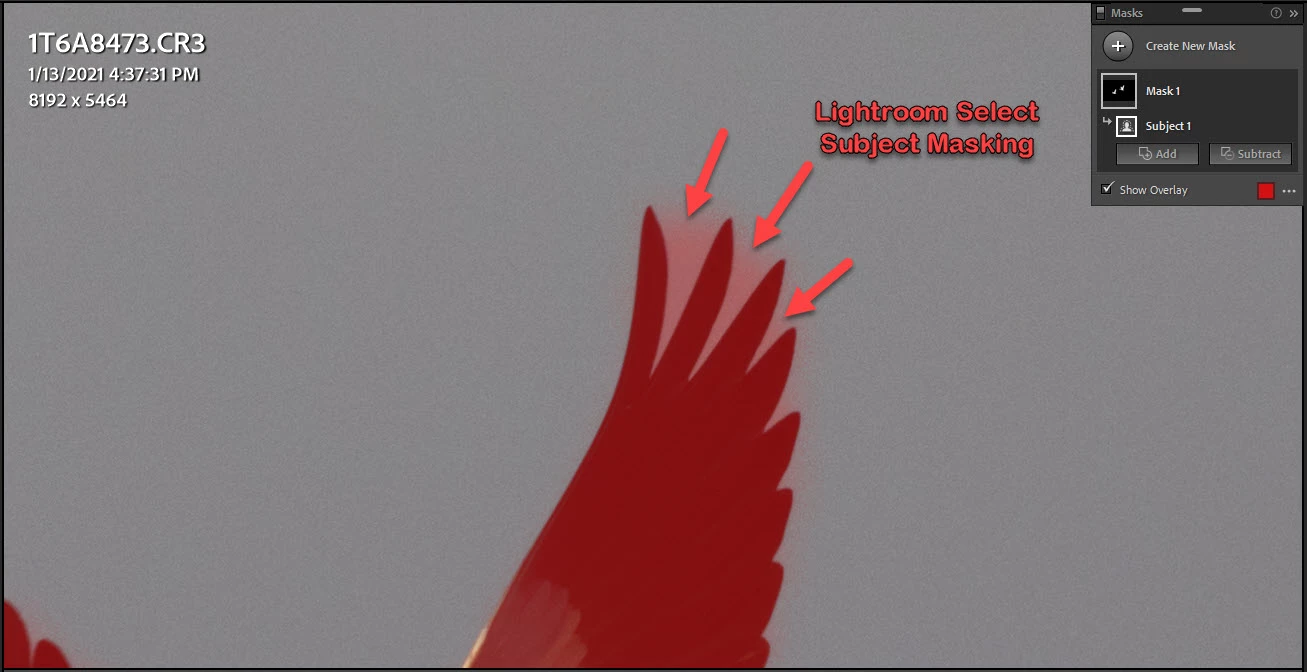
 

My configuration: Windows 10 Home, Lightroom Classic CC 11.0.1, Alienware Area-51m R2,Intel(R) Core(TM) i7-10700K CPU @ 3.80GHz, 3792 Mhz, 8 Core(s), 16 Logical Processor(s), Installed Memory (RAM)64.0 GB,NVIDIA GeForce RTX 2070 Super (8GB), Nvidia Studio Driver 472.47 (November 2021)

4 replies

GoldingD
Legend
November 19, 2021

You could also use an intersect, say the color range.


Jerry_aAuthor
Inspiring
November 18, 2021

Thanks, that's a good suggestion. However, In my case, it deleted the mask in parts of the bird itself. Using a subtraction (erase) brush with "Auto Mask" checked worked better.


All that said, I'd still like to see the smart development people at Adobe refine Subject Mask feature. 

Ian Lyons
Community Expert
Community Expert
November 18, 2021

I forgot to attach an example. In some situations 'Subtract & Luminance Range' may be more appropriate.


Ian Lyons
Community Expert
Community Expert
November 18, 2021

You should be able to remove the sky by uisng Subtract & Color Range