


anilthomastkd
Participant
October 2, 2023
Open for Voting

P: (Masking) Like to reuse my LR masks in intersection or subtract
  • October 2, 2023
  • 4 replies
  • 538 views

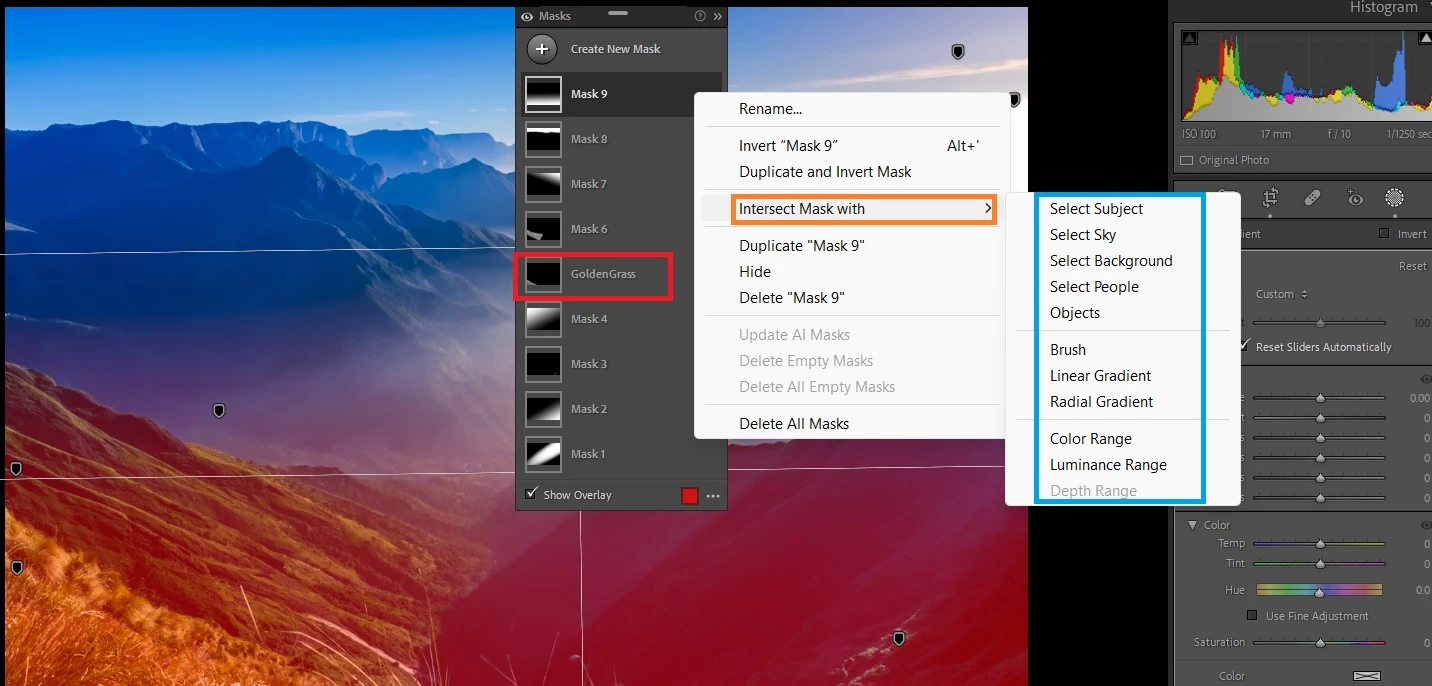
I would like too see the mask marked in red (my mask) in the list marked in blue (options) in attached screen shot. Better if LR can automatically (using AI like body parts in portrait pictures) create some luminance and color masks too.

4 replies

SLWRTHNU
Participant
September 17, 2024

It would be really nice if I had the option to "Add" or "Subtract" from one mask, by selecting another. A good example of why is when I select a new mask and select "subject" for example. But it doesn't select all of the actual subject, and/or selects things that aren't the subject. I then have to go through and either Add or Subject by selecting Objects, or Brush, or whatever else. Then, if I want to select the opposite, I have to do the same process, just opposite buttons. 


I know there is the "Duplicate and Invert" option, which is great, but that only works if you're starting a new mask, not if you've synced settings from another image. For me, I'll edit a photo in a set, get it how I want it to look, apply the settings to all images, then go through making adjustements to each photo to give them a uniform look. I don't do presets, but this is close enough. 


Having an option to click "Subtract" and selecting "Mask 3" having it remove everything that is selected in Mask 3, for example, would make for a much faster workflow. 

Participant
October 2, 2023

Yes. This can reduce time to procesd

Participant
October 2, 2023

Yes, needed

Participant
October 2, 2023

This option will be very useful