



P: Multi-select and batch manage multiple selections within a single mask
Multi-select and batch manage multiple selections within a single mask
Description:
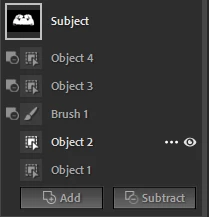
In the current masking panel, it is not possible to select multiple selections within the same mask.
For example, when a mask contains several selections such as Object 1, Object 2, etc., I cannot Shift-click / Ctrl-click / Cmd-click to select multiple selections and perform actions on them together.
Currently, we are forced to:
-
Move selections to another mask one by one
-
Delete selections one by one
-
Invert or manage each selection individually
I would like to have the ability to:
-
Shift-click / Ctrl-click (Cmd-click on macOS) to multi-select multiple selections within one mask
-
Move selected selections together into another mask group
-
Delete, invert, or manage multiple selections at once
This would greatly improve efficiency when working with complex masks and multiple detected objects.
 AdChoices