


thomasbauer
Participant
October 29, 2021
Open for Voting

P: Need larger Icons for Hi-resolution Monitors

  • October 29, 2021
  • 2 replies
  • 524 views

Hello


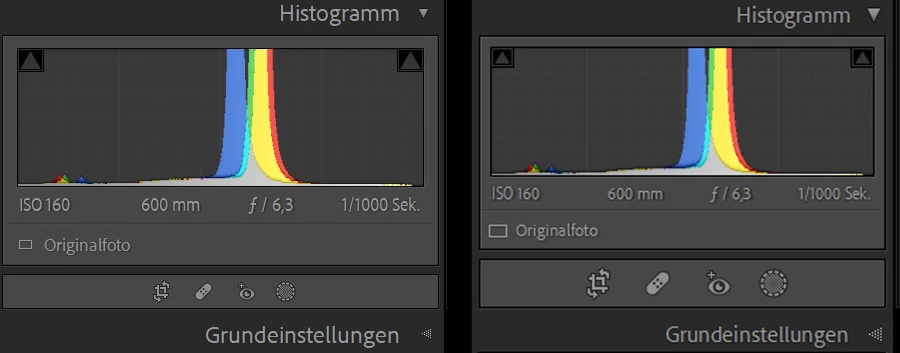
After upgrading to LR Classic 11 (Windows 10 21H1) I realized that the icons for crop/resize, repair tool and the new masking functionality are too small on my 4k screen - on my second monitor (2k resolution) everything looks fine.

I attached a screenshot: Left = 4k screen, Right = 2k screen.

Can you check and fix this for the  next release?


Thanks,

Thomas
 

2 replies

Inspiring
October 11, 2023

Attached screenshots were done with sceewn resolution 3840x2160. Scaling factor is 150%. Monitor size 32''. Icons representing processed images and other information are almost invisible. They are extremely small. When Scaling factor is 200% (LrC properies / interface / font size)  - icons are 2-3 times bigger and looks ok, but user interface elements get huge. Please go through whole UI at 4k monitor and sacling factor 100-150% and fix visibility of all elements. There will be many corrections. For now - I focused on icons on thumbnails.

Inspiring
July 10, 2023

The problem is related especially to 4k monitors under W11. Some parts of UX are almost invisible. Inactive icons are grey on slightly brigter grey. In my case: monitor 32" 4k, system scaling 150%. The size of icons is ok. These part is well readable when scaling is set to 200%, but everything becomes in this case. In my opinion, the icons shoul have better contrast. 

Also tooltips should be more descripitive. When mouse cursor is hover over eg. any of flags: the message is the same: "filter based on flag status". If I almost can't see the icons, I don't know wich flag will be clicked. 


Inspiring
July 10, 2023

...but everything becomes huge...