GoldingD
Legend
January 18, 2022
Open for Voting

P: Provide Preference File Health Check, backup, Reset, and Restore.

  • January 18, 2022
  • 2 respuestas
  • 261 visualizaciones

Often a Preference File is suspected of being corrupt. This, when odd things happen. Request that a menu item be added to check the Preference File health. And while adding that, include a button to back up preferences, reset preferences (in a more obvious location and as opposed to keyboard sequence) , and to restore the settings we may have selected before the preference file got corrupted.


Option to accomplish this could in two locations.


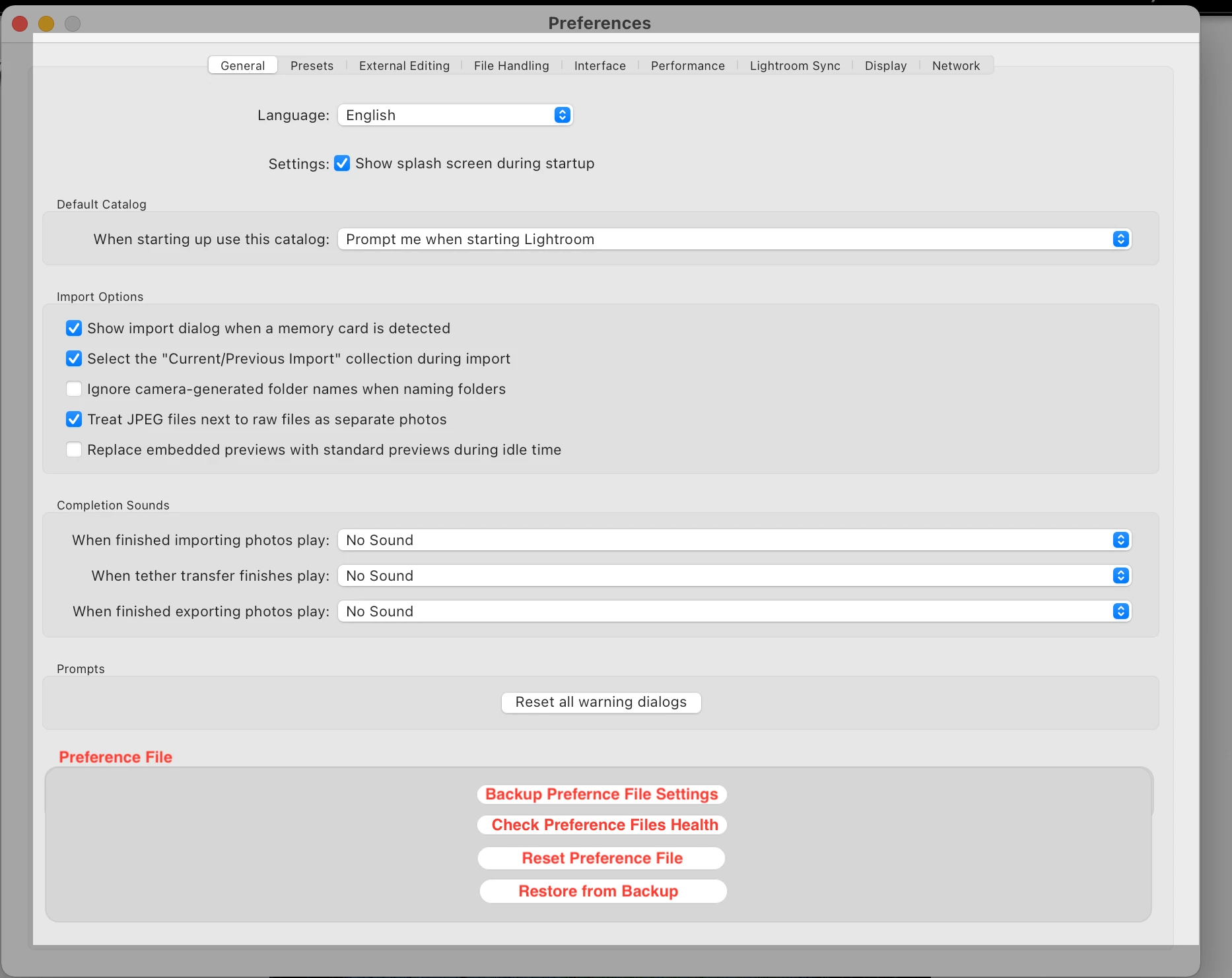
The main one being a section in /Preferences/General, add buttons to:


  • Backup Preference Settings
  • Check Preference Files Health
  • Reset Preference File
  • Restore from Backup


Obviously Warnings will be required, one being the health check would require closure of LrC (assumption). One being that preferences may be reset to defaults (hence the backup and restore button)


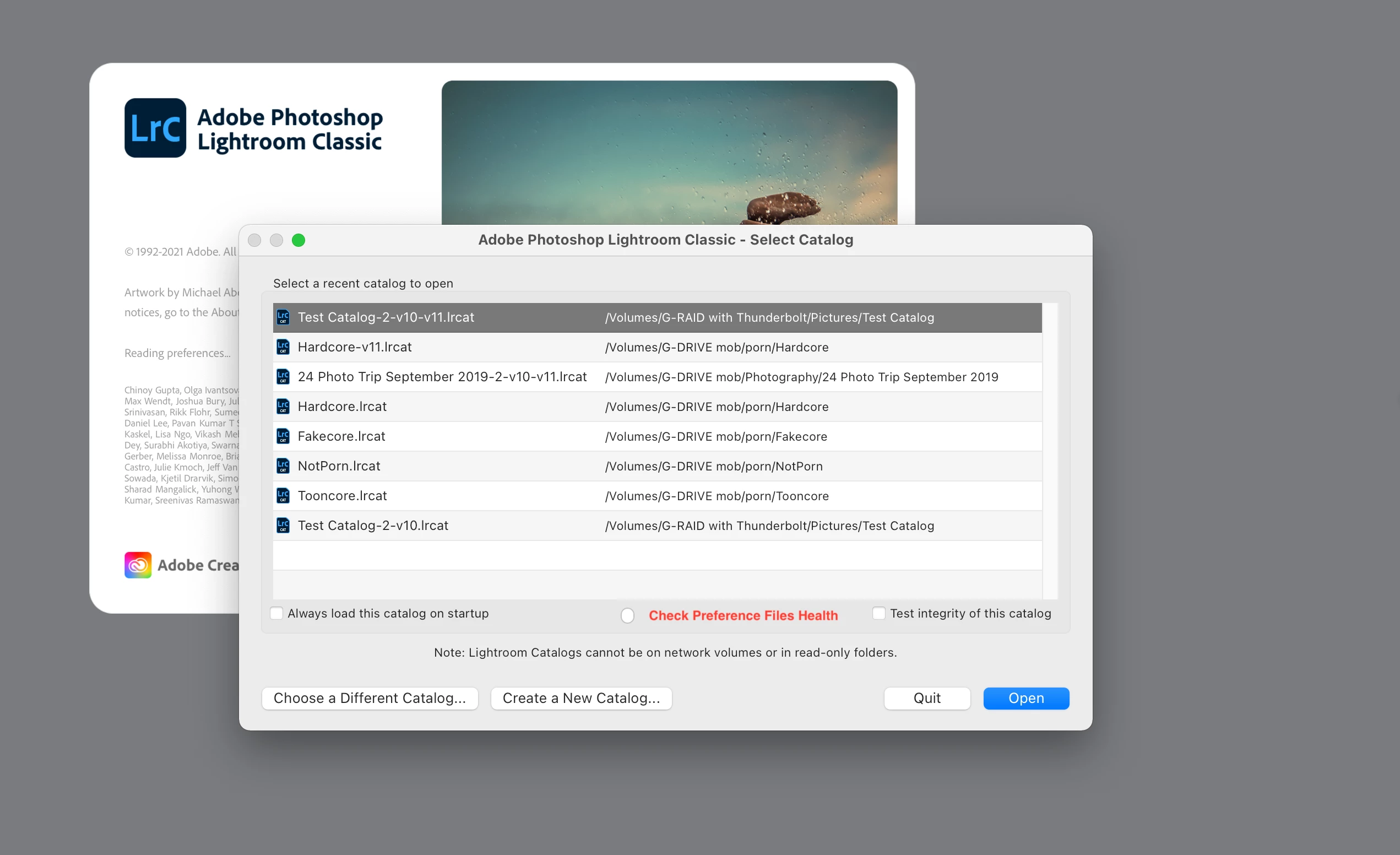
A second, bit probably more rudimentary location would be in the optional Select Catalog screen, that most do not use


2 respuestas

johnrellis
Legend
January 19, 2022

"check the Preference File health"


I think that this would be practically impossible to implement. As discussed in that other thread, I believe that most instances of "corrupted" preferences are the result of a deeply flawed architectural design. In addition to explicit user settings, the preferences file also stores a large amount of internal user-interface state. Due to a deeply flawed architecture, it captures elements of that state inconsistently -- rather than doing a "point-in-time" capture of the state, it sometimes captures elements of the state as they are being changed.  

johnrellis
Legend
January 19, 2022

Fully support the general idea. I had posted the following Idea in the old feedback forum, which got 14 votes, but it didn't get copied here:


________________________________________________________________________

https://feedback-readonly.photoshop.com/conversations/lightroom-classic/lightroom-classic-reset-preferences-should-save-a-backup-of-the-preferences/5f5f46084b561a3d426f8e72 


Lightroom Classic: Reset Preferences should save a backup of the preferences


Reset Preferences (Alt/Opt + Shift when starting LR) should make a time-stamped copy of the current preferences file, and it should give the user the option of restoring preferences from one of the recent copies.


This would directly help the myriad users who are told to "reset preferences" when anything goes wonky in the user interface, making it easier for them to restore their original preferences in the frequent case when resetting doesn't help.


And it would make it easier for Adobe product developers to track down the bug(s) in the preferences design that "corrupts" them so frequently. When a user on the forums reports that resetting solved their problem, we could ask them to send the previous version of the preferences file to Adobe for an autopsy.


This would be very simple to implement. The Reset Preferences dialog would give the user these options:

----------------------------------------
Reset Lightroom preferences?

[Start Normally]
[Reset Preferences, Making a Backup Copy]
[Restore Preferences from a Backup Copy]
[Show in Finder/Explorer]
----------------------------------------


The [Restore Preferences from a Backup Copy] button would pop up a list of previously saved copies of the preferences file, letting the user choose one.
________________________________________________________________________

tim_mcmahon_8007176


Great idea! I've very seldom had issues with Lightroom but the tohught of having to remember and restore existing preferences has always put me off resetting prefs as a fix option.

________________________________________________________________________

Victoria_Bampton_Lightroom_Queen


Love that idea.


Victoria Bampton a.k.a. The Lightroom Queen
www.lightroomqueen.com
Author of Adobe Lightroom Classic - The Missing FAQ and Adobe Lightroom - Edit Like a Pro books.

________________________________________________________________________

anthony_blackett

Yes, a good idea. I usually make my own backup of the preferences file before trying a reset because I have learned that resetting often doesn't fix my problem, so then I can manually restore my prefs from the backup.

________________________________________________________________________

carlos_cardona_4982447


It’s unanimous!

________________________________________________________________________

oldsteve


Ditto Photoshop. Why cannot Adobe just give us a way to do whatever resetting Preferences does without losing choices?

________________________________________________________________________

John_R_Ellis


The evidence suggests there is a serious architectural flaw in how LR updates its preferences file. (Note that the preferences file stores much more than just the settings the user has selected.) See this thread for more details:

https://community.adobe.com/t5/lightroom-classic-bugs/lightroom-reset-your-preferences-moving-from-the-magic-spell-to-a-more-serious-approach/idc-p/12668692#M25896


If my understanding is correct, fixing the flaw involves a large amount of effort and technical expertise.