


Inspiring
May 3, 2022
Open for Voting

P: Snapshots naming conventions

  • May 3, 2022
  • 8 replies
  • 1290 views

Some might consider this just a minor irritation but for someone who uses SNAPSHOTS in the develop module extensively, it is more than this.

im very happy with LRc providing a default name for each new snapshot, but can the naming convention be changed to: [YEAR][MONTH][DAY][TIME] as the current naming convention of [DAY][MONTH][YEAR][TIME] does not keep a logical order, or at least a logical date order. The attached screen grab as an example:
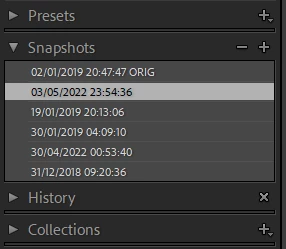
I don't mind either numeric sort order of latest first or oldest first, just ordered logically.

David

8 replies

C.Cella
Inspiring
September 24, 2023

@Rikk Flohr: Photography 

How one can get the same date format in the catalog for all images after changing the OS date format?


.


C.Cella
Inspiring
September 24, 2023

I changed my Mac OS Date format and according to what I set I do get different Snapshot naming format


I have imported a new photo and now the metadata for that photo is expressed differently, depending on the OS date format.


So now basically is "my fault" if the date format has been written as DD/MM/YY

I have never been aware of this.


There should be a way for users to choose the LrC date format and not be bound by OS date format.


How can I, how can we fix this and get the same date format expressed in our catalog for all our past images?

.

C.Cella
Inspiring
September 24, 2023

@Per Berntsen 


Thanks for bringing this to my attention.

My OS format is set to YYYY/MM/DD format but LrC is not affected.

See screenshots below.


Mac OS


LrC


Only the field "Capture Date" is clear and not confusing.


So I am puzzled now.

I thought we all had the same date format.


Per Berntsen
Community Expert
Community Expert
September 24, 2023

@C.Cella 

My metadata look like this, with no ambiguity about which number is the year, and which is the date.

I'm guessing that Region/Regional format settings in the OS play a part here, mine are set to Norway/Norwegian.


Inspiring
September 24, 2023
C.Cella, many thanks for contributing to my post but I am confused as to what you are adding to my post which was directed specifically to John as a reply to his previous comments. My original post was specifically about the structure of the naming of snapshots and as John states, even though its default is date based, the field itself stores as text. It is the formatting of this default I was focusing on. Anyway, thank you for your contribution.
Regards
David
Inspiring
September 24, 2023

Hi John,

I created this idea post back in may 04, 2022 and have not added to it, just letting it gain pace or not. I saw it as a simple idea to implement in isolation but have since seen it's implementation may impact internally many other fields or at least set an unintentional format presidence. Obviously it is disappointing that there has been no real Adobe discussion on this point, especially as we are now up to release 12.5. If {IMO} this field in isolation was dealt with as it is {a textual representation of the date}, and therefore adding {but not so extensively} the similar function of Timothy Armes impressive plugin, this would give far better structure and order to this field than is currently possible.
...but it has been nearly a year and a half and while i accept product development can be a slow beast, we have not a peep from Adobe, do you think this idea is a dead duck?
Regards

David

C.Cella
Inspiring
September 24, 2023

Adobe has opted for the "wrong" dating convention/format internally at all levels IMO


Look at metadata.


Was this taken in 2023 or 2022.

Adobe makes it hard for us to know.


I know LrC uses internally as default DD/MM/YY for metadata, but this opens the door to plenty of confusion.


And let's look at history and specifically export.


Sure NOW I know it happened in 2023 BUT in one year this export state will be confusing and unclear...all past Export step are a mess now.

Drag this step to Snapshots and you have double confusion.


As @johnrellis pointed out Adobe should have opted or a YYYY format but didn't.


Morale: Adobe should use YYYY/MM/DD or DD/MM/YYYY not truncated YY.


.


Known Participant
May 1, 2023

What kind of sorting is that?

First I have snapshots from today, then snapshots from yesterday.

But first I have snapshots from early today then from late today.


Lightroom Classic 12.3, Windows

johnrellis
Legend
May 1, 2023

[This post contains formatting and embedded images that don't appear in email. View the post in your Web browser.]


They are sorted alphanumerically, treating the snapshot names as strings, not dates, in the same way that LR and File Explorer sort folder names:


"01" comes before "30". 


I agree that it's not very useful.  It would have been better for LR to name the snapshots in yyyy.mm.dd format, regardless of the language and region settings of the computer.

prbimages
Inspiring
May 2, 2023

Of course, you can rename the snapshot at the time you create it. Give it a name that will sort in the order you prefer.