

johnrellis
Legend
April 24, 2023
Open for Voting

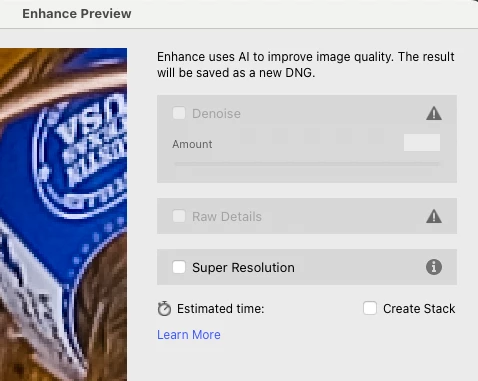
P: Tell the user why Denoise and Raw Details are greyed out

  • April 24, 2023
  • 5 replies
  • 3667 views

The Enhance dialog should explain why Denoise or Raw Details are greyed out by providing a simple explanation:


Denoise and Raw Details don't work on the selected file types: <file types>


where <file types> provides the precise file formats of the selected files: mRAW, sRAW, linear DNG, JPEG, TIFF, PSD, PSB, etc.  LR has that information internally -- it just needs to show it to the user.


In addition, Learn More should link to a page that provides a comprehensible explanation. Right now, it just says "any Bayer or X-Trans RAW files" -- how many non-nerd users know what those are?


This trivial change would avoid hours of user frustrations and needless FAQs here.


5 replies

Participant
January 24, 2024

This is rediculous.  We dont need surprises like this from a large software co like adobe.
I took 2000 images today and cannot denoise cr2?????
Yesterday it was still fine.
Surely , they cannot manipulate to this extend.
Can someone refer a more reliable software?


Participant
July 18, 2023

Agreed!

DdeGannes
Community Expert
Community Expert
April 24, 2023

Agreed.

Regards, Denis: iMac 27” mid-2015, macOS 11.7.10 Big Sur; 2TB SSD, 24 GB Ram, GPU 2 GB; LrC 12.5,; Lr 6.5, PS 24.7,; ACR 15.5,; (also Laptop Win 11, ver 24H2, LrC 15.0.1, PS 27.0; ) Camera Oly OM-D E-M1.
Sean McCormack
Community Expert
Community Expert
April 24, 2023

Gets mine too. 

Sean McCormack. Author of 'Essential Development 3'. Magazine Writer. Former Official Fuji X-Photographer.
TheDigitalDog
Inspiring
April 24, 2023

Just got my vote! 

Author “Color Management for Photographers" &amp; "Photoshop CC Color Management/pluralsight"