



Inspiring
January 31, 2024
Open for Voting

P: Thumbnails sizing in Library Module

  • January 31, 2024
  • 2 replies
  • 240 views

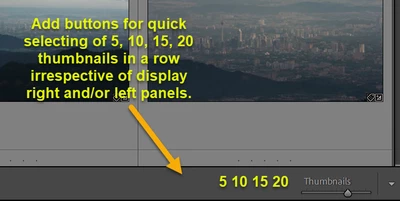
Propose having hot buttons to preselect total number of thumbnails per row in Library grid mode. This would speed up zooming in and out of photos grid for a better view for culling purposes (ie marking colors, flag). At times you want see the forest and at times you need to have a quick view to reveal out of focus photos which are not obvious in forest view. The present slider is at times slow to respond. On the 4K display the max without side panels display its 24. Propose to have 5, 10, 15, 20 quick buttons.

Attached is an approximate visual representation 
 

2 replies

CS ChuaAuthor
Inspiring
February 1, 2024

I use the ctrl-Wheel scroll .. however on my 5 year old laptop too much lag.
The proposal does spoil the aesthetics. Perhaps having snapping major ticks will be be a better way. Set them at 0, 25, 50, 75, 100%.

Conrad_C
Community Expert
Community Expert
January 31, 2024

It’s a nice idea. Another, simpler way to do it that would be more flexible and take less space, is have one button/shortcut that toggles between two thumbnail sizes that you choose. Similiar to how the Z key toggles between Grid and the last used Loupe magnification. If you want more than two sizes, then maybe three buttons that can each be preset to a certain thumbnail sizes. But five buttons you can’t change might be the least flexible way while taking the most space.


If it takes a while before they decide to do it, what I do instead is not use the slider, instead I press the - and = keys which are more precise and tend to respond faster than the slider.