



Robbie Khan
Known Participant
January 9, 2021
Open for Voting

P: UI add Dark Mode or Interface Customization

  • January 9, 2021
  • 21 replies
  • 7627 views

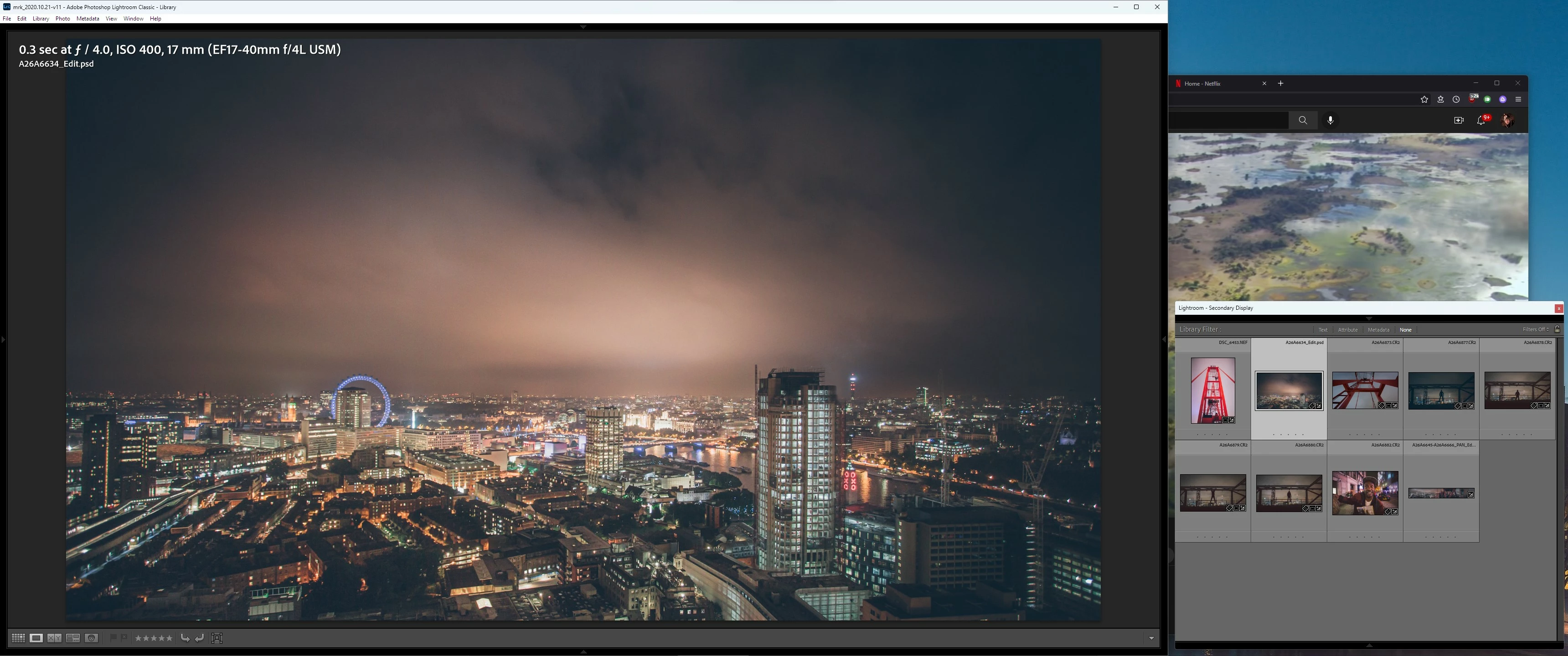
Dark mode in Windows would be very useful, I use it on my system and everything is very eye pleasing, but the LRC toolbar is still white which ends up being distracting when working on dark photos since the rest of the UI is dark. It makes no sense that the toolbar does not follow the OS system theme, or at least have a proper dark mode option in LRC settings somewhere?


Pic related,t hanks!
 

21 replies

C.Cella
Legend
March 23, 2026

Idea was merged and renamed.


Interface customisation is a more demanding engineering tasks that requires more work than simply offering "dark theme" dialogs or dark app header.

Interface customization would require to have floating panels, the ability to move panels where we want, in the order we want...which is what Photoshop has been offering for two decades bascially.

Floating panels I see it unlikely in the near future, the only one we have is masking and we can't even pin it on the other side of the Loupe.


Lighting Classic already offers panel customization in develop but such code was never reused for library panels (despite requests)

The team could start from there.


We have the options swap panels left-right but we have no option to move all panels to.one side, which would be beneficial for those professional users that work with "display tablets" such as Wacom.

Also requested.


In fact there were several requests to have full user interface customization but they seem to have been lost in the various forums migration over the years.


I think this thread should be UI / Add Dark Mode and allow Interface Customization 


They go hand in hand.


Srishti Bali
Legend
March 23, 2026
The following idea has been merged into this idea:

All the votes have been transferred into this idea.
C.Cella
Legend
March 23, 2026

ACR allows to choose UI color.

What is most problematic at least to me in LrC is that floating dialogues, modal dialogues and various dialogues are all "white theme".

LrC user interface is dark, aside for Loupe(s) background, so summoning these dialogues causes eye strain,.eye I fatigue; it's literally going from dark to white in a fraction of a second...it's "blinding".


@johnrellis has developed at least one floating dialogue with dark theme Ui, a considerable effort given the extremely limited capabilities of the SDK in this area , and that dialogue still provides good visibility without being uncomfortable for the eyes .


Already looking at the monitor it's quite unhealthy but "Dark mode/theme" has been offered across devices as an industry standard, a standard to which LrC yet has not aligned.

With a little doese of "good will" I am sure it ca be be done.


FWIW LrD has only dark UI.

Rich_NC
Participant
March 23, 2026

Just came back to LR Classic after a couple of year hiatus and can’t believe this is still an issue. Given the huge sums of money Abode is charging for this SW every year this is a comical lack of attention to detail. Dark mode was only introduced to MacOS in 2018, Adobe, do better! ​@adobe 

Participant
November 20, 2025

How come it's almost 2026 and your most pro app for photo editing still forces us to have a white background in things like the export panel, preferences, the photo merge/hdr panel, window title bar, etc. Please finally give us an option to turn it all to dark mode!

johnrellis
Legend
November 21, 2025

Moderators, @Rikk Flohr: Photography, please merge with this existing idea:

https://community.adobe.com/t5/lightroom-classic-ideas/p-ui-add-dark-mode-or-interface-customization/idi-p/13220654


@danielremian, be sure to upvote that idea in the upper-left corner.

Participant
November 16, 2025

Yeah it's an aesthetic issue, but still bothers me when we've finished an series of edits in the dark winter months only to be blinded by a white dialog box that I desperately try to avoid.


This is with the latest version of LrC (15.0.1) and I'm on macOS Sequoia (15.7.1) but this has been ongoing since macOS introduced dark mode years ago, and I would love to see this finally resolved.

Participant
August 7, 2025

Hola a todos,

Espero que me podáis ayudar con un problema que no consigo resolver. Estoy intentando establecer una interfaz de color claro (no oscura) tanto en Lightroom como en Lightroom Classic en mi ordenador con Windows, pero sin éxito.

Mi objetivo es simplemente poder trabajar cómodamente en un entorno con buena luz natural, ya que el tema oscuro dificulta la visibilidad.

Este es el comportamiento que experimento en cada programa:

1. En Lightroom (versión de la nube): La interfaz se mantiene permanentemente en modo oscuro. He configurado el modo de aplicación de Windows en "Claro" (utilizando el modo "Personalizado" para mantener la barra de tareas oscura). A pesar de haber reiniciado la aplicación varias veces (incluso forzando el cierre desde el Administrador de Tareas) y haber reiniciado el ordenador por completo, la interfaz de Lightroom no se ve afectada y sigue siendo oscura.

2. En Lightroom Classic: Aquí he conseguido un cambio parcial. En Preferencias > Interfaz, he logrado cambiar el color del fondo del área de trabajo, pero los paneles principales (Navegador, Biblioteca, Revelar, etc.) permanecen en gris oscuro. No encuentro una opción que afecte a toda la interfaz de forma global.

Ya he agotado las soluciones habituales y parece que las aplicaciones no están respondiendo a la configuración del sistema operativo. ¿Hay alguna otra solución, configuración en algún archivo o posible bug conocido que pueda estar causando esto?

Agradezco de antemano vuestra ayuda y vuestro tiempo.

Un saludo.

Gunther Wegner
Known Participant
April 14, 2025

Lightroom has a dark interface thus doesn't support Darkmode since years. This is so long overdue. Please add Darkmode for Titelbars and dialogs. This can't be so difficult.

Known Participant
March 31, 2025

Please Fix Again: My feature request was erroneously added to another unrelated thread AGAIN within 20 minutes! I guess this is how Adobe deals with suggestions!


It has absolutely nothing to do with this two year old discussion on how to add Dark Mode Dialogs or change the interface colors !


I am referring to the Lightroom Classic CC "Background Color" or "Proof Matte Color" around the image not in the image! (and not the interface or dialog boxes!)


How contrast and brightness are perceived greatly depends on the simultaneous contrast with the color around the image, I use it to get exposure even on a white wall which usually is around 90-95% in Soft Proofing mode, but it does not work if it's a color, or not close to one of the pre-defined values. Also it's very sad that I can't choose my own background color like Photoshop has been able do do since the 90s.


Screenshots of what I am referring to:


Known Participant
March 31, 2025

The ability to change to a custom background color in Library/Develop instead of just having to choose between White / Light Gray, Medium Gray etc... like in photoshop would be amazing. The main reason I work in Soft Proofing Mode is the ability to choose 80/90/95% white!  Just adding a custom color option would allow a ton of flexibility with a minimal amount of coding!