


Participating Frequently
March 28, 2012
Open for Voting

P: Use whole screen in the develop and library modules

  • March 28, 2012
  • 13 replies
  • 771 views

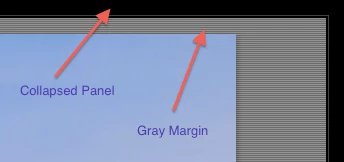
I would like to use the entire area of my monitor to see my photos. As it is, LR4 always steals some space from the four edges of the screen for the collapsed panels. On top of that, photos in "fit" mode get another margin between the panels and the photo.

There should be a way to get rid of the edge bars for the collapsed panels. They are essentially very large buttons and are unnecessary. Moving the mouse to the edge of the screen could accomplish the same thing. (you could still show them in the click-to-expand mode)

The "fit" mode should get rid of the extra margins. I know they look pretty, but form should follow function and not the other way around. (perhaps make it an option).

If you do the math, the collapsed panel bars and the margins take up 13% of the screen


PS: THIS HAS NOTHING TO DO WITH LION'S FULL SCREEN MODE PLEASE DON'T MERGE MY TOPIC AGAIN.

13 replies

dorin_nicolaescu
Inspiring
March 29, 2012
It could be made smarter: 1 px hot zones for sides that touch the desktop edge, and ~10px zones for other sides.
Participating Frequently
March 29, 2012
The dock is not a problem. Lightroom already prevents the dock from showing in full screen mode anyway.

I hadn't thought about the multiple-monitor scenario, but keeping mouse-sensitivity in the area where the border used to be would do the trick. Just getting the cursor close to the edge would expand the auto-hide panels (except when using tools like brushes and such).


I would expect this mode to work at least in the Develop module, but a borderless Loupe would also be nice.
ssprengel
Inspiring
March 28, 2012
Moving the mouse to the edge of the screen is not sufficient to activate a hidden panel if there is more than one monitor, because moving the mouse cursor to and then slightly overshooting an edge with an adjacent monitor merely puts the cursor onto the other monitor. Also, if there is a dock or taskbar along one edge, then the mouse does not stop at the edge of the LR window, either, and if the dock or taskbar is set to autohide, then it is activated by moving the mouse to that edge, not LR.

My version of your request, would be to have an additional "borderless" full-screen mode in the sequence of screen modes cycled through with the F key that removes the collapsed-panel-unhide hover area and the extra (gray) border. Any unhidden UI elements should still be shown--clicked open panels and the tool menu, for example.

A question would be whether this mode only works in Develop or only in Library or only those two, or if it is more universal.

Another question is what happens with the secondary-monitor when borderless is activated. Right now, it has top and bottom unhide areas, but nothing along the sides.