


Inspiring
January 3, 2014
Released

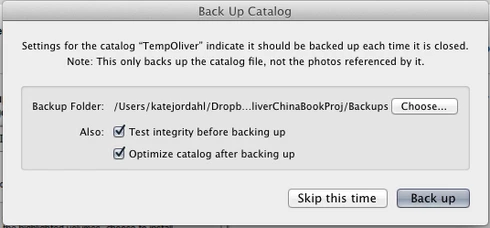
P: Wish for a "cancel" button on "Back Up Catalog" box

  • January 3, 2014
  • 61 replies
  • 1974 views

If I had only one wish for the next Lightroom update, it would be a cancel button on the last dialog when you close a catalog. I like the reminder to back up each time, but sometimes I click quit too soon or by accident. It would be great if the "Back Up Catalog" dialog included "cancel" next to "Skip this time" and "back up." Thanks.
61 replies

Participant
September 22, 2018
I've been on this thread for probably 6 years waiting for this feature (along with a couple other crazy-obvious feature requests). Always glad to see someone new bring it up agaIn because it's beyond frustrating. Just don't get too worked up. I think Adobe would rather see us suffer.
Inspiring
September 22, 2018
That’s not the point being discussed. It’s simply having Adobe add a cancel button to the close dialog. Often when you think you are closing an image you are closing Lr. It’s a huge time sink to have to reopen the program, back up or not, you can’t cancel once you hit close, your only option is back up or not.

That’s the issue- Adobe give us a cancel button.
Known Participant
September 22, 2018
I have found—especially with very large catalogs in which LR creates a zip archive as the backup—the most workable solution is to not allow LR to make ANY backups.  Instead, I use a third-party utility to mirror the dedicated drive where I have located Lightroom.  I can cancel the 'backup' (which is actually a mirror by any other name) whenever I wish and the application—in this case SyncBuddy for the Mac OS—only begins the backup when Lightroom has closed.  Restore is a simple matter of copying the mirror back to the source.

The only manual step I have to perform is to remember to optimize the catalog in Lightroom before quitting (although this isn't a stringent requirement IMHO).

I found myself going down this path as my catalog grew into the GB range because LR was so damn slow in performing the backup; it took hours for LR to quit.

There are simply some tasks for which LR is woefully inadequate; e.g., backup, moving of files, copying of files, naming or renaming of files, lens/camera profiles, etc.  I have found it better for a robust catalog and image file system to allow specialist software to perform these tasks.

Unfortunately, LR is also pretty crappy at managing hierarchial keywords, but I do not see any alternative but to struggle along with LR for that chore.
Inspiring
September 21, 2018
I live in the Bay Area, and  go to User Group talks at Adobe, and I have gone in and played with new features for other products they are developing.  Earlier this year on one of those visits I heard they have something like 40 people working on LR, so keep mentioning this, they will do it if enough people tell them to.  It is a squeaky wheel issue.
Inspiring
September 21, 2018
THis thread started 5 years. It is clear that Adobe is not "considering" this. It's not as though it is impossible. If you set LR to perform a task, like, say, Export, and then you attempt to close LR, it asks you if you really want to do so. So, it is feasible. For whatever reason, Adobe has decided to ignore this.
cornicellophoto
Known Participant
September 21, 2018
I thought it was just me! 🙂 Too often when moving quickly between applications and with the w and q keys next to each other I accidentally quit Lightroom. Just another button in the closing dialog box would be so wonderful...  Thanks for considering!!!
TheDigitalDog
Inspiring
June 8, 2018
I am usually able to correctly type a key but I also never use LRs silly backup; unlike it, I back up EVERYTHING using an app designed for that task that also has zero issues with key commands.
Author “Color Management for Photographers" & "Photoshop CC Color Management/pluralsight"
Inspiring
June 8, 2018
You're totally missing the point!
TheDigitalDog
Inspiring
June 8, 2018
How difficult can it be to change the code to do that.
Apparently rather difficult and more so than typing the desired and correct key! 
Author “Color Management for Photographers" & "Photoshop CC Color Management/pluralsight"
Participant
June 8, 2018
Correct typing is not the issue, it is when you change your mind. The x to cancel the dialog box is pretty much universal everywhere except Lightroom. How difficult can it be to change the code to do that. Inability to type the correct key is really a non issue, the issue is expecting the dialog box to behave the same way as every other dialog box.