



P: AI-Assisted Wildlife Burst Culling in Lightroom
As camera technology has advanced, wildlife photography has reached a tipping point.
Modern cameras routinely shoot at 20, 30, 40 FPS and beyond. Capturing key moments requires bursts because photographers have only fractions of a second to capture motion behaviour a barn owl striking prey, a kingfisher entering water or an eagle flying close.
The result is that a good morning in the field can easily generate 500–2,000 images, with hundreds of near-identical frames from burst sequences. Good fieldcraft and technique captures THE image. The challenge is finding it.
The Last Bottleneck
I am an experienced wildlife photographer, speaker and Lightroom advocate. Every presentation I give and almost every wildlife photographer I meet asks the same question:
"How do you deal with burst photos, and do you ever get tired of the editing process?"
The answer is that editing is no longer the issue. Culling is.
You guys have transformed image editing with an amazing suite of tools. However, wildlife photographers still spend countless hours manually reviewing burst sequences to identify the one frame with - Sharp eye focus | wing position | pose
This process is repetitive, time-consuming and largely mechanical. I work in IT and this is exactly the type of problem AI is built to solve.
My Workflow In Lightroom TODAY
-
Import images into Lightroom Cloud.
-
First pass: remove obvious failures and assign ratings.
-
3★ = keeper
-
4★ = potential edit
-
-
Tag species and behavioural information.
-
Review burst sequences using Compare mode.
-
Examine groups of 10–15 similar frames looking for:
-
Sharp eyes
-
Strong poses
-
Clean composition
-
-
Select finalists and mark them for editing.
-
Perform detailed editing.
-
Final keywording and publishing.
Everything in this workflow works perfectly. The bottleneck is Step 4. On a productive day photographing, this step alone can consume hours.
The Adobe Opportunity
Wildlife photographers may not be the largest photography segment, but they are very engaged Lightroom users.
Some AI business model gymnastics assures me that the global market size for wedding is maybe 10:1 v Wildlife. However, with 41 million subscribers to Creative Cloud Photography Plan (at $120 per year take 15% photographers and 1.5% Wildlife. Call it 500,000 and if just 5% of those are serious enough to subscribe that nets out to 25,000 x $120 = $3 Million.Enough for a developer or 2? 😎
I invest in Lightroom because my workflows depends on:
Big archives | Cloud sync | keywording | AI denoise | Smart AI masking | Mobile acces | Long-term storage
Admin v Creative
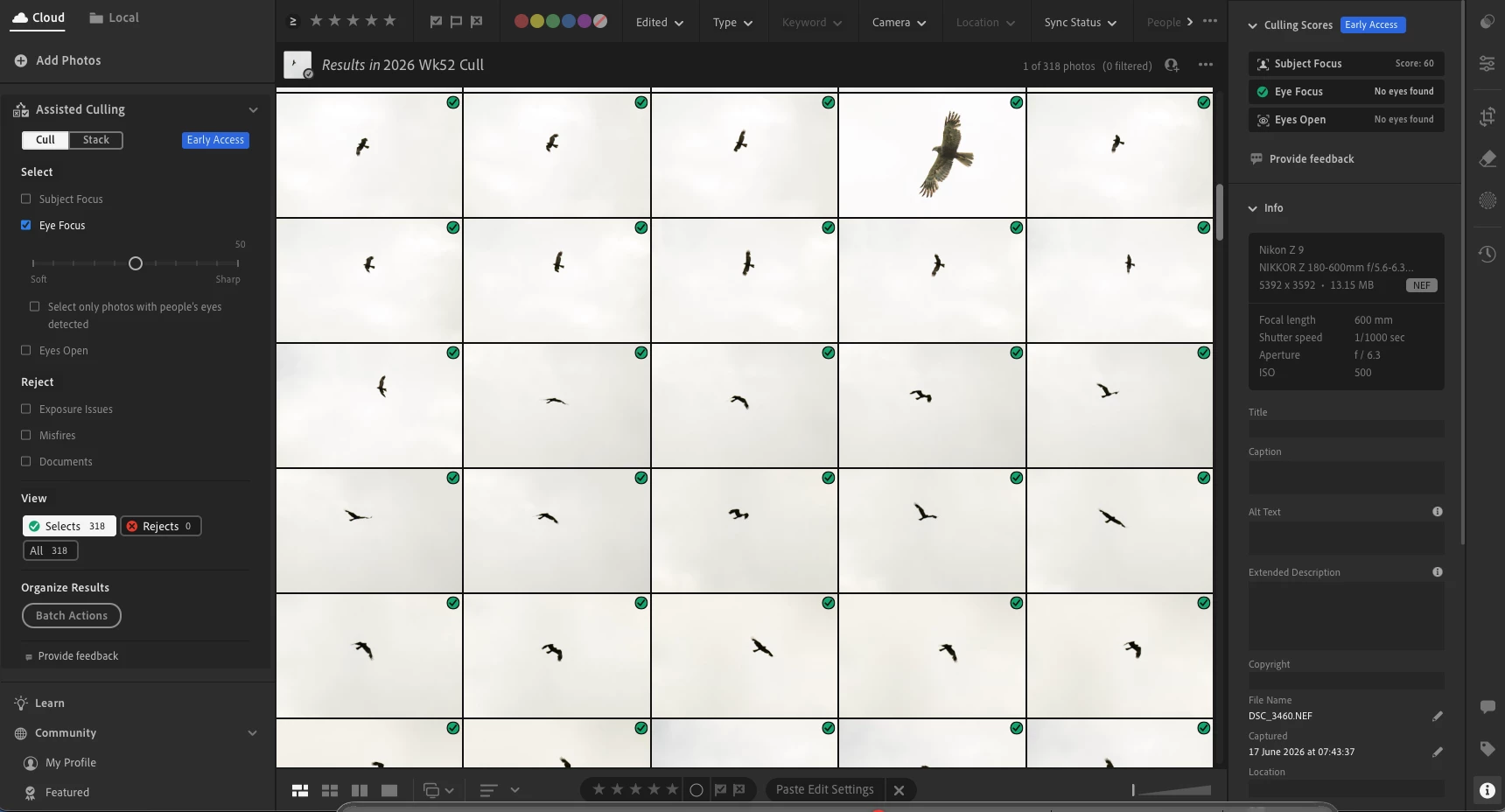
Editing is creative, but culling is “admin” and that makes a huge difference! Happy to spend time making a perfect final creation. But … what kills me is spending hours comparing 300 identical frames to find the one that is sharper than the rest (see below). Every hour saved is an hour back for shooting and most important of all … my wife :-)
You know somethinsg wrong when you walk out the door and your partnder says - “Remember not to take too many pics and remember to select 10FPS every now and again”!
A Perfect Storm for Adobe AI
You guys already have ALL the underlying tech:
-
Subject detection
-
Spatial analysis
-
Eye detect
-
Focus analysis
The final piece of teh jigsaw is bringing it all together into a workflow to eliminate the repetitive work to find the strongest candidates. Indeed Lightroom is already awesome & this would make is THE goto for a growing genre that supports nature and educates people on teh planet.
Sample below. 300 classic wilidlife images of a Harrier at distance. Cropped 1. Current Assisted Cull cannot see eyes in any of them so fails 100%
 AdChoices