



Antoine HLMN
Known Participant
November 16, 2018
Open for Voting

P: Search ignores album names

  • November 16, 2018
  • 29 replies
  • 1434 views

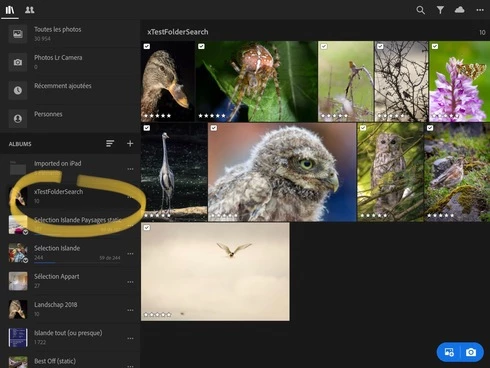
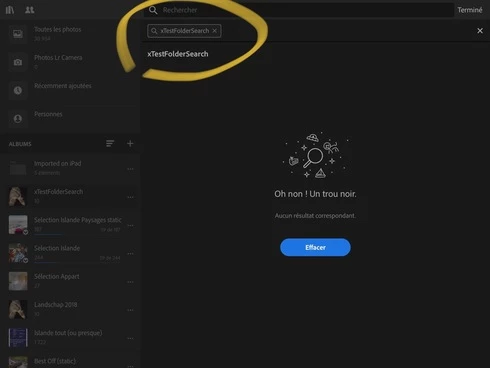
Strange bug on iPad: the search functions totally ignores the folder names. Here are two screenshots illustrating the bug:An album called xTestFolderSearch containing 10 pictures:... and yet the result for the search of the folders name “xTestFolderSearch” yields nothing 😮
29 replies

Antoine HLMN
Known Participant
June 25, 2019
Thanks Victoria!

I hope all the bugs will be taken into account by the dev (managemement / marketing) team.
Victoria Bampton LR Queen
Community Expert
Community Expert
June 25, 2019
done
Victoria - The Lightroom Queen
Antoine HLMN
Known Participant
June 25, 2019
Can a mod please change the title with “album” instead of folder so this bug can be assessed and solved?
Antoine HLMN
Known Participant
November 16, 2018
Indeed, my Albums are synced down from desktop, whereas I keep the directly imported (through SD card) pictures in a Folder. That’s the only way I found to keep smart previews and real raws (and counting in the 20 Go) separates.
JohanElzenga
Community Expert
Community Expert
November 16, 2018
Ah, sorry. I should have zoomed in to look at your screenshots more closely and not just have read the text and the title of the thread. You aren’t using folders to search. A folder can be used to hierarchically organise your albums (see screenshot). You are only using albums and you are searching on album name. I agree that it would make sense if you could do that. I would consider this a feature request, not a bug report.

-- Johan W. Elzenga
Antoine HLMN
Known Participant
November 16, 2018
Again: “You’re using it wrong” ??? Really? Ok, I’ll rephrase:

This looks strange. The most important feature referring to an image or image set must be its ALbUM, don’t you think? Being the date, location or subject, I assume that key element is almost every time used in the folder name.

Some people might name their ALBUM “2016 Vacation in Hawaï”, “2018-06-12 ModelNam”, “Job for this client”, “Wedding ThosePeople”. Don’t you agree THIS is the most important field to search for?

By the way, in my screenshot, those are indeed albums, my bad (or collections, if you prefer). But still. The search feature totally ignores the albums. You cannot search for a specific album or for the pictures contained in a album.
JohanElzenga
Community Expert
Community Expert
November 16, 2018
You misunderstand what a folder in Lightroom CC really is. It is not a physical folder like the ones on your computer hard disk. It is also not a physical folder on the Adobe server. The name is misleading. A better name would have been ‘Album Set’, because that is all it is: a way to organise albums.
-- Johan W. Elzenga
Antoine HLMN
Known Participant
November 16, 2018
This looks strange. The most important feature referring to an image or image set must be its folder, don’t you think? Being the date, location or subject, I assume that key element is almost every time used in the folder name.

Some people might name their folder “2016 Vacation in Hawaï”, “2018-06-12 ModelNam”, “Job for this client”, “Wedding ThosePeople”. Don’t you agree THIS is the most important field to search for?
JohanElzenga
Community Expert
Community Expert
November 16, 2018
This is probably as designed. A folder is just something that you can use to organise your albums. It does not contain images by itself and so its name is not included in searches.
-- Johan W. Elzenga