



Frank_B
Inspiring
March 11, 2024
Open for Voting

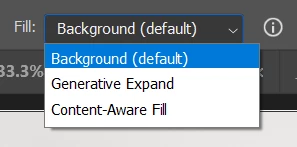
Add option to set different type of Fill as a default (Content Aware, Generative).
  • March 11, 2024
  • 15 replies
  • 3859 views

Right now the default is Background and when working with batch of photos and we need to crop-extend the image edges it requires repetetive task of changing fill type. Not only that. After chenging the fill type, arrow keystrokes don't move the crop grid/frame anymore but they navigate between the fill type.

Please add option to set default Fill as:
- Background
- Content Aware
- Generative (additionally with no pop-up text field when we don't want to add anything extra).

Thanks.

15 replies

Participant
November 3, 2024

Adobe, please fix this issue as described above.  When switching to the crop tool, I want to be able to set Generative Expand as the default option. 

Participant
October 23, 2024

Been facing the same issue as Nikki24079644p6x2.


Please fix it ASAP or let us choose what the default method is. This is annoying.

Known Participant
September 14, 2024

Background for me wasn't the default, generative fill was, after the last Beta update it's now background default, and I now need to change it every single time, what changed, why can't generative fill be the default? It is beyond frustrating I now have to change my step process of editing, to make sure I cahnge this from background to generative fill. Never used to, would change the image, if it left space, it automatically knew to generative fill. 


Frank_B
Frank_BAuthor
Inspiring
March 12, 2024

Thank you for asking. Here is example how changing type of Fill is affecting the arrows keystrokes (no longer moving the image):
https://streamable.com/6zp8de

In terms of the default Fill type I might have been wrong as I thought it's always Background as default but Photoshop seems to remember the last used type of Fill which kind of solves my case.

EDIT:
Correction, as I initially thought the type of Fill is by default Background. So this is not user friendly in my case.
Example. I open 5 photos from Lightroom in Photoshop (ctr-e) and the Fill by default is set to Background. Switching to Content Aware in the first opened image doesn't seem to affect the settings in other opened images which means it needs to be done manually every time. But if I do this in the beginning of the cropping process it means I can't use arrow keystrokes for the precise cropping movement.
Hope this makes sense.
The solution would be an option to set a default Fill type.
Additionally it would be useful if changing the fill type wouldn't take over the arrow keystrokes functionality.

CShubert
Community Manager
Community Manager
March 11, 2024

Hi @Frank_B thank you for your suggestion. Could you walk us through your workflow from start to finish so the team understands what issues you are seeing along the workflow?


Thanks,

Cory - Photoshop Product Manager