


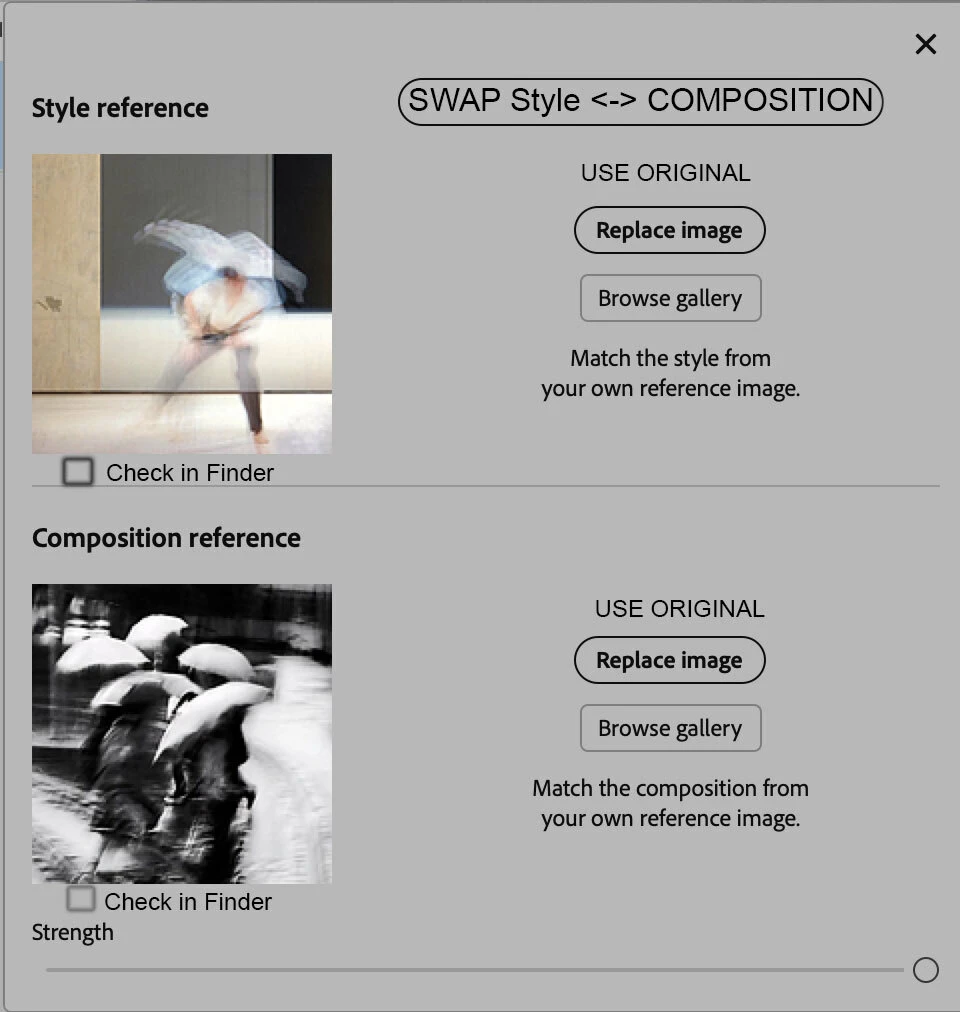
Generative Image.1.A button to swap Style with Composition. 2. A button to find in the Finder the images used in Composition or Style.3 Extend the “Choose the Open Image” to Style and Composition present in the Beta version to the current version
Please check http://rbaezd.myportfolio.com, as you may see I am serious about AI. I require some minor adds to Generative Image: 1. a button to swap Style with Composition. 2. A button to find in the Finder the images used in Composition or Style. And please! do not abandone this wonderful feature.3 Extend the possibility of using the references to Style and Composition “Choose the Open Image” present in the Beta version to the current version
In my research with Generative Image, I don’t use text prompts. I simply enter “.” to let the AI work on its own, suggesting ideas based on my references in Style and Composition. These are then developed in layers and further refined, gradually building my own work.
It is, however, a rather delicate trial-and-error process in which I use my own references as well as those of other authors. Sometimes I would like to be able to exchange the role of the images used in Composition and Style references, it would be helpful to have a button to do this
While reviewing my work on Photoshop documents with layers with AI generated by Generative Image,, I often try to remember which image I used for each Composition or Style reference, but I am only given small icons that don’t allow me to know where these images are located in my Finder. It would therefore be very useful to simply click on them and have Photoshop reveal their parent folder.
And finally in the BETA version you may use the composition feature based in the Open Document, it would be useful to extend this ti Style and update it to the current version of Photoshop
 AdChoices