
Participant
October 27, 2023
Open for Voting

icon covering layer masks

  • October 27, 2023
  • 14 replies
  • 4226 views

I'm not really sure how to describe this problem.  I believe it is part of the latest Photoshop CC release for Mac.  I noticed today that all of my layer masks have a weird square icon with a circle in the center, in the preview.  It's covering up about 50% of the mask, so i cant tell which mask is which by lookign at them.  I'm not sure what this is supposed to indicate but it's really annoying and I am looking for a way to turn it off, so i can see my layer masks.  see screenshot below.


I'm running Photoshop 2024 25.1.0 release on Mac running Ventura 13.6.1
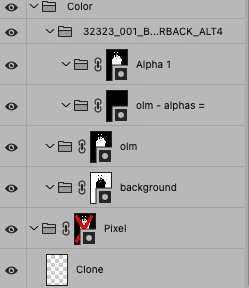
14 replies

StephenWebster
Inspiring
November 15, 2023

Adobe- Stop "fixing" issues that were not broken. Please allow those of us who know it's a mask to see the mask. 

Participating Frequently
October 27, 2023

Having updated to PS25.1 today, I see the layer mask icon has changed and there is now a mask icon bottom right of the mask icon. 

This means you have no quick check as to how your mask looks in entirety - you have to view it full screen. 

Which is a real nuisance. I wonder whether it was actually asked for, or whether someone just had a bright idea? Maybe they thought that no one knew what the layer mask icon meant?

Is there any way we can restore the legacy and much more useful plain mask icon which gave an adequte preview, or do we have to roll back to 25.0. (Which then disables auto updates!!!) There has to be a little folder of icons somewhere, where one can go and swap the old for the new. 

J E L
Community Expert
Community Expert
October 30, 2023
Not being unkind at all, but why add yet another preference that has to be read, slows startup and just adds bloat
It would appear to be an utterly useless addition: get rid of it in entirety. Just put it down as a bad idea.

Get Outlook for Android<>

Oh, no worries, I know you aren't being unkind. I would rather not have the icon at all, either. But if it must be there, setting a legacy preference is the next best thing. I once joked that we might be offered a legacy version of Photoshop to install one of these days.

Participant
November 7, 2023

Yes, please let the user turn this icon off - it is extremely annoying not being able to see which mask is which

Participant
November 6, 2023
Not sure where someone got the brilliant idea to cover ½ of the mask preview with that….isn’t have the mask itself, enough to indicate it’s a masked layer??? My team are all reverting back to older versions of photoshop. It’s insane.

Thanks.

________________________________

This message is for the designated recipient only and may contain privileged, proprietary, or otherwise confidential information. If you have received it in error, please notify the sender immediately and delete the original. Any other use of the e-mail by you is prohibited. Where allowed by local law, electronic communications with Accenture and its affiliates, including e-mail and instant messaging (including content), may be scanned by our systems for the purposes of information security, AI-powered support capabilities, and assessment of internal compliance with Accenture policy. Your privacy is important to us. Accenture uses your personal data only in compliance with data protection laws. For further information on how Accenture processes your personal data, please see our privacy statement at https://www.accenture.com/us-en/privacy-policy.
______________________________________________________________________________________

www.accenture.com
Kevin Stohlmeyer
Community Expert
Community Expert
November 6, 2023

@Rachel.kleinman We're all adjusting to this - its an icon indicating a masked layer. Unfortunately there doesn't appear to be a way to disable at this time. Since this isn't really a bug - I can move this to the Ideas forum where if users can upvote a control, it may help.