
michaljanata
Inspiring
February 2, 2026
Open for Voting

Orange color for Color editing tools

  • February 2, 2026
  • 3 replies
  • 60 views

In Photoshop I would like to have colors in all color editing tools (Saturation, Selective color atc.) similar as it is in Lightroom.
Especialy orange is very usuful when editing skin tones.
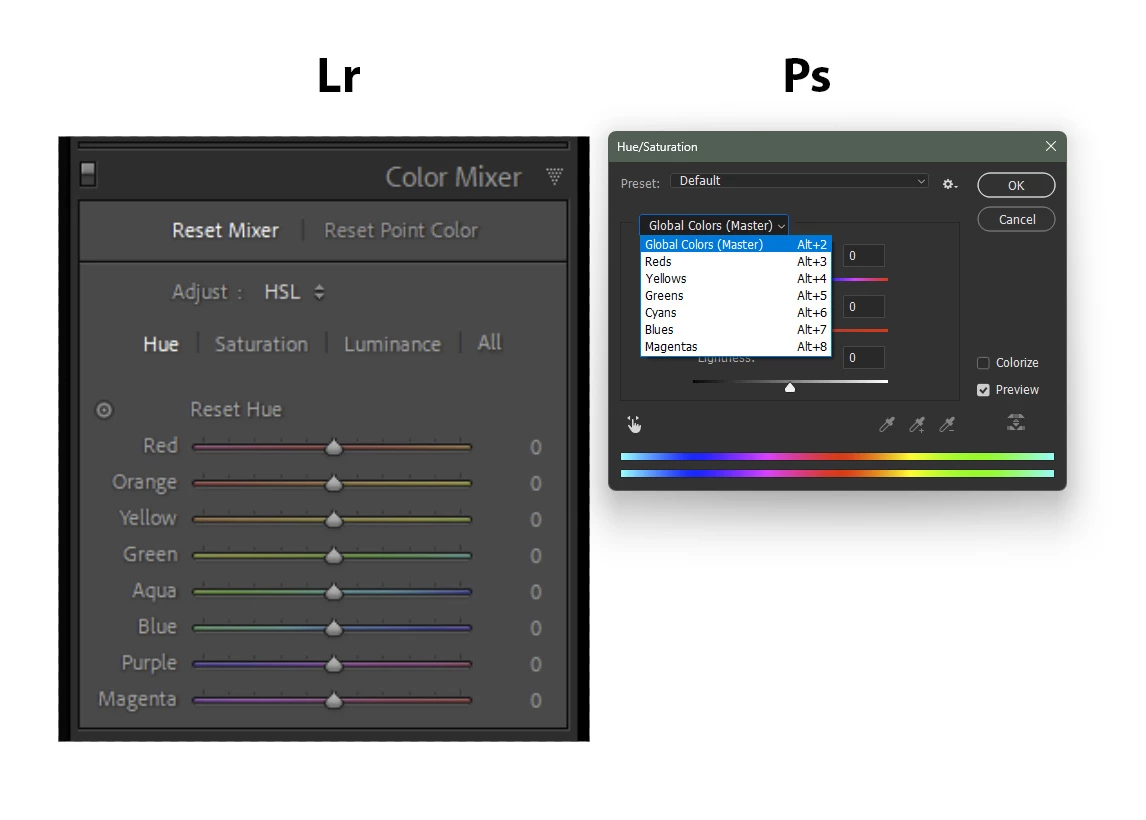


    3 replies

    michaljanata
    Inspiring
    March 3, 2026

    .

    Earth Oliver
    Legend
    February 2, 2026

    Looks like you’re using an older version of Ps. Try updating the app to see the new Hue/Sat panel...

    michaljanata
    Inspiring
    March 3, 2026

    not true, I’m using always latest updates, 27.4 now


    Rob_Cullen
    Community Expert
    Community Expert
    February 2, 2026

    You could use the Camera Raw Filter  [Shift+Ctrl/Cmd + A]  in Photoshop.

    Or better - open your image in Camera Raw before it opens in Photoshop.

    This is Camera Raw FILTER-


    Regards. My System: Windows-11, Lightroom-Classic 15.1.1, Photoshop 27.3.1, ACR 18.1.1, Lightroom 9.0, Lr-iOS 10.4.0, Bridge 16.0.2 .
    michaljanata
    Inspiring
    March 3, 2026

    yes, i know, but it is not always best/fast for my workflow with actions… i cant see any reason not to have orange in Hue/Saturation tool

    michaljanata
    Inspiring
    March 3, 2026

    @jane-e  I know where I posted. I just replied that Camera raw is not solution for me, thats all. I dont get your comment.
