


Inspiring
September 10, 2012
Open for Voting

P: Inverting Pressure Input/Custom Pressure Curves for Painting

  • September 10, 2012
  • 16 replies
  • 2959 views

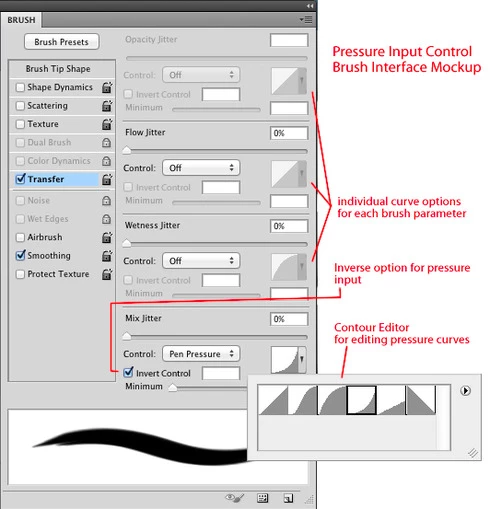
It would be great to be able to invert pressure input from wacom tablets for brush parameters. The most basic implementation would be an "invert" checkbox next to each parameter. A more powerful idea would be to have customizable pressure input curves for each parameter. This could be done with the "contour editor" used to control various layer style falloff options.

In particular, I found that the pressure input for the Mixer brush's "mix" slider was the reverse of what I thought it should be, but the ability to customize the input curves for all parameters would create many new ways to use the brush tool. These curves could also be used to control exactly how much force on the pen is needed, allowing artists to work at a comfortable level of pressure and still enjoy the full range of input. This would greatly enhance the entire painting experience! Thanks!
16 replies

Inspiring
May 5, 2017
Mix control is inverted in literally every other painting program.  C'mon adobe, your painting support is terrible.  These features are standard these days.
Inspiring
November 9, 2016
CC 2017? Are you kidding? 
Participating Frequently
August 23, 2016
Posted 4 years ago (((
Participant
September 26, 2014
Please, please, please, PLEASE. It's the only thing that's keeping me from making the switch from Manga Studio. The ONLY thing. ...Well, there's also the really nice "Close and Fill" tool, and then there's the adjustable brush smoothing, but... I'm getting way off track.

My point is, this is a really make-or break feature for me. I got a Surface Pro 3 because I can't afford a Cintiq yet, and while it certainly is more convenient to use than my old brick of a laptop, it can be really hard to get the pressure heavy enough. I have to use a lot of force (which causes the screen to freak out a little) just to get, for example, a heavy opacity when it's controlled by pen pressure. This is fixable with MS's customized curves; all I have to do is pull the point at which max output is applied to a lower input level. You can also control the curves for and have almost any setting controlled by any combination of angle, velocity, and of course, pressure, among a few others.

Photoshop really, really needs to get on the ball with this. I haven't seen many improvements to the brush customization options in years, and that's depressing. Please, please take a page out of Smith Micro's book and let us painters use your software without all this fuss. Once I hear about such improvements, I'll start subscribing to CC so I can use it on my Surface. Until then, I'll have to stick to Manga Studio. 😞
Participant
August 22, 2014
I agree completely, the mix slider feels backwards because it restricts flow as it's increased. That is logical but it feels limiting because high mix yields a soft influence. It should be a light press or at least have the option to invert it.

I've been using pen tilt to compensate but it's pretty wacko.
Inspiring
November 10, 2012
Can someone explain why the brush control panel DOESN'T look and work like this?

This would eliminate so much frustration wrestling to get brushes to do what I want them to. I frequently want very different sensitivity curves on different aspects- sometimes even reversed from what the programmers at adobe apparently consider to be the only way anyone would ever want it to work.

At the moment, only hours of tinkering with strange dual-brush/texture combinations can even come close to mimicking the functionallity this would allow me to set up in a matter of seconds.

I've actually been trying to find a python script that does almost exactly what you describe here for ages, and never been able to find one- I've been considering learning python scripting just to be able to fix the problem myself. XD

I want to see this added, like, yesterday.