


Open for Voting
Photoshop: Make "Blend Colors Using Gamma" a document setting
"Blend Text/RGB Colors Using Gamma" should be a document or layer setting instead of a global setting. The user should have the ability to set the default option. There could still be a global setting for documents that don't have specified gamma blending settings.
Here's a simple scenario:
A designer makes a graphic in Photoshop CS5. The Star shape and text layers are each set to black with layer fill set to 45%. All Photoshop color settings are at default. The file is sent to a user with CS6 or the designer upgrades to CS6. The Shape and Text layers no longer look the same. Mass confusion.
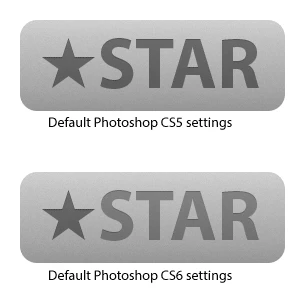
The current settings are hidden away, like they aren't supposed to be messed with, yet I am seeing recommendations to disable Blend Text Colors Using Gamma: http://bjango.com/articles/photoshopc...
I was tempted to label this as a "Problem" rather than an "Idea."
There are simple workarounds for this issue, but you can't expect users to know what is happening in the first place, especially with how well hidden the gamma blending preferences are.
Here's a simple scenario:
A designer makes a graphic in Photoshop CS5. The Star shape and text layers are each set to black with layer fill set to 45%. All Photoshop color settings are at default. The file is sent to a user with CS6 or the designer upgrades to CS6. The Shape and Text layers no longer look the same. Mass confusion.
The current settings are hidden away, like they aren't supposed to be messed with, yet I am seeing recommendations to disable Blend Text Colors Using Gamma: http://bjango.com/articles/photoshopc...
I was tempted to label this as a "Problem" rather than an "Idea."
There are simple workarounds for this issue, but you can't expect users to know what is happening in the first place, especially with how well hidden the gamma blending preferences are.
 AdChoices