



idjev
Known Participant
April 8, 2024
Open for Voting

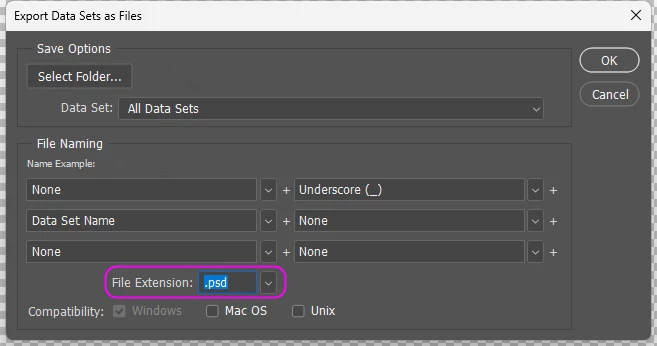
Variables - Export Data Sets as Files

  • April 8, 2024
  • 7 replies
  • 1672 views

I think the file extension should not be limited to just .pds and .tif, .jpeg, .png, .pdf... should be added among the options. These options will not only save time for the user, but will also make business life a little easier. I think this feature can be added to Photoshop. It will add some more value to Photoshop.... thanks


7 replies

Stephen Marsh
Community Expert
Community Expert
September 4, 2025

@FosterDouglas 


Your second point is addressed below.


I have just updated my "Data Sets to Files" script to v1.1!


Adding a dropdown menu to select the dataset encoding (Auto, UTF-8, UTF-16, Shift-JIS, Macintosh, Latin-1).


Simply change the Auto setting to UTF-16 when importing a UFT-16 encoded text file to preserve non-Latin characters without the annoying warning triggered by the Auto setting.


Participant
September 3, 2025

@Stephen Marsh I've been really enjoying using the v1.0 version of this tool. Two small bugs to report... 


1) if any of the cells of data in a input data set have a trailing space in them, the tool seems to skip replacing that value and just uses the value from the previous loop. I didn't test this extensively, but it seems to be true at least some of the time.


2) when using a UTF-16 encoded file (which I needed to use for special characters), the tool gives the standard warning of "Could not parse the file contents as a data set. There were not enough variable names in the first line of the text file." – that's the same warning the regular Photoshop data set import tool gives if you use a UTF-16 encoded file but don't use the Encoding drop down to select correspoding encoding. If I press "Okay" the tool continues to run, with that warning up, until it completes.


Been using WEBP for all of these tests, if that's helpful.


Anyway, incredible tool, even with those quirks it has saved me dozens of hours already. Thank you!!

Stephen Marsh
Community Expert
Community Expert
April 25, 2025

I forgot about this particular topic thread... Here is the latest version of the script which I reworked from the original code from the late Mike Hale, adding a GUI and options for naming suffix and choices for saving to JPEG, PNG, WebP, TIFF and PSB output file formats.


https://community.adobe.com/t5/photoshop-ecosystem-discussions/using-datasets/td-p/2665594/page/2#U15189770


Stephen Marsh
Community Expert
Community Expert
April 25, 2025

@Kalirobot – Thank you for sharing!

Participant
April 25, 2025

Hey,

here’s a version that allows you to export data sets as JPEG, PNG, and WebP.
WebP was especially important for us to optimize the images for our online shop.


#target photoshop;

var separator = '_';
var jpegEmbedColorProfile = true;
var jpegFormatOptions = FormatOptions.STANDARDBASELINE;
var jpegMatte = MatteType.NONE;
var jpegQuality = 10;

function fileImportDataSets(file) {
    var desc = new ActionDescriptor();
    var ref = new ActionReference();
    ref.putClass(stringIDToTypeID("dataSetClass"));
    desc.putReference(charIDToTypeID("null"), ref);
    desc.putPath(charIDToTypeID("Usng"), new File(file));
    desc.putEnumerated(charIDToTypeID("Encd"), stringIDToTypeID("dataSetEncoding"), stringIDToTypeID("dataSetEncodingAuto"));
    desc.putBoolean(stringIDToTypeID("eraseAll"), true);
    desc.putBoolean(stringIDToTypeID("useFirstColumn"), true);
    executeAction(stringIDToTypeID("importDataSets"), desc, DialogModes.NO);
};

function applyDataSet(setName) {
    var s2t = function (s) { return app.stringIDToTypeID(s); };
    var descriptor = new ActionDescriptor();
    var reference = new ActionReference();
    reference.putName(s2t("dataSetClass"), setName);
    descriptor.putReference(s2t("null"), reference);
    executeAction(s2t("apply"), descriptor, DialogModes.NO);
};

function getDataSetNames(csvFileRef) {
    var _ftn = function (string) {
        var csvItems = string.split(",");
        var datasetName = csvItems[0].replace(/(^['"]|['"]$)/g, '');
        return datasetName;
    };
    csvFileRef.open();
    var datasetArray = [];
    var i = 0;
    var csvString;
    while (!csvFileRef.eof) {
        csvString = csvFileRef.readln();
        if (csvString.length < 2) continue;
        datasetArray[i] = _ftn(csvString);
        i++;
    }
    csvFileRef.close();
    return datasetArray;
};

function padNumber(number) {
    var str = number.toString();
    while (str.length < 4) { str = "0" + str; }
    return str;
};

function jpegSaveOptions() {
    var options = new JPEGSaveOptions();
    options.formatOptions = jpegFormatOptions;
    options.embedColorProfile = jpegEmbedColorProfile;
    options.matte = jpegMatte;
    options.quality = jpegQuality;
    return options;
};

function pngSaveOptions() {
    var options = new PNGSaveOptions();
    options.interlaced = false;
    return options;
};

function isValidFormat(fmt) {
    return fmt === "jpeg" || fmt === "png" || fmt === "webp";
}

try {
    if (app.documents.length > 0) {
        (function () {
            if (!confirm("Data Sets must be created before running this script. The text layer for the file name suffix must be active... Continue?", false)) {
                return;
            }

            if (app.activeDocument.activeLayer.kind !== LayerKind.TEXT) {
                app.beep();
                alert("The active layer isn't a text layer!\rThe text layer for the file name suffix must be active...");
                return;
            }

            var csvFileRef = File.openDialog("Please select CSV file:");
            if (csvFileRef === null) return;
            fileImportDataSets(csvFileRef);

            var saveFolder = Folder.selectDialog("Please select the output folder:");
            if (saveFolder === null) return;

            var format = prompt("Enter export format (jpeg, png, or webp):", "jpeg").toLowerCase();
            if (!isValidFormat(format)) {
                alert("Invalid format. Only 'jpeg', 'png', or 'webp' allowed.");
                return;
            }

            var datasetNames = getDataSetNames(csvFileRef);
            var fileCounter = 0;

            for (i = 1; i < datasetNames.length; i++) {
                applyDataSet(datasetNames[i]);

                var docName = app.activeDocument.name.replace(/\.[^\.]+$/, '');
                var suffix = app.activeDocument.activeLayer.textItem.contents;
                var saveFile = new File(saveFolder + "/" + docName + separator + suffix);

                if (format === "jpeg") {
                    saveFile.changePath(saveFile.fsName + ".jpg");
                    app.activeDocument.saveAs(saveFile, jpegSaveOptions(), true, Extension.LOWERCASE);
                } else if (format === "png") {
                    saveFile.changePath(saveFile.fsName + ".png");
                    app.activeDocument.saveAs(saveFile, pngSaveOptions(), true, Extension.LOWERCASE);
                } else if (format === "webp") {
                    saveFile.changePath(saveFile.fsName + ".webp");
                    var opts = new ExportOptionsSaveForWeb();
                    opts.format = SaveDocumentType.JPEG; // dummy fallback
                    opts.quality = 90;
                    app.activeDocument.exportDocument(saveFile, ExportType.SAVEFORWEB, opts);
                }

                fileCounter++;
            }

            app.beep();
            alert(fileCounter + " files have been saved to:\n" + saveFolder.fsName);
            app.activeDocument.close(SaveOptions.DONOTSAVECHANGES);
        })();
    } else {
        app.beep();
        alert('A template file must be open before running this script...');
    }
} catch (error) {
    app.beep();
    alert(error + ', Line: ' + error.line);
}

Best regards,
Dennis J.

Stephen Marsh
Community Expert
Community Expert
May 10, 2024

@Lumigraphics - I agree that some individual files might need adjusting, however for those people who simply require direct flattened file output such as JPEG, this would seem to be a valid request.


The late Michael Hale wrote a script to directly save data sets to JPEG. Surely the native feature loops over the data sets on the fly to create the output files, just as in the scripted alternative below:


Forcing users to indirectly output and convert layered PSD files to JPEG or other formats via Batch or Image Processor or other scripts is less than ideal.


Legend
April 8, 2024

You are creating layered files, which require TIFF, PSD, or PSB to save those layers. JPEG, PNG, etc do not support layers.